> ## Documentation Index
> Fetch the complete documentation index at: https://archie.com/docs/llms.txt
> Use this file to discover all available pages before exploring further.
# Date field
> Date fields store calendar dates and timestamps. Pick the timestamp type to match how you'll use the value.
A Date field stores temporal data. Depending on which timestamp type you choose, it can hold a plain calendar date (a birthday), a precise moment in time (when a transaction posted), or a wall-clock time (when a shop opens). Picking the right type up front avoids time-zone surprises later.
## Timestamp types
| Type | What it stores | When to use it |
| - | - | - |
| **Date** | Year, month, day. No time component. | Birthdays, holidays, due dates, anything where the time of day is irrelevant. |
| **Timestamp with time zone** | A precise moment in time, normalized to UTC. | Records of when something happened (logins, payments, message sends). The default for most timestamps. |
| **Timestamp without time zone** | A wall-clock date and time, ignoring time zones. | Concepts that apply identically everywhere — "shop opens at 9:00 AM", recurring schedules. |
If you're not sure, use **Timestamp with time zone**. It's the safest choice for most "when did X happen" fields and avoids ambiguity when records are created from different regions.
## Configuration options
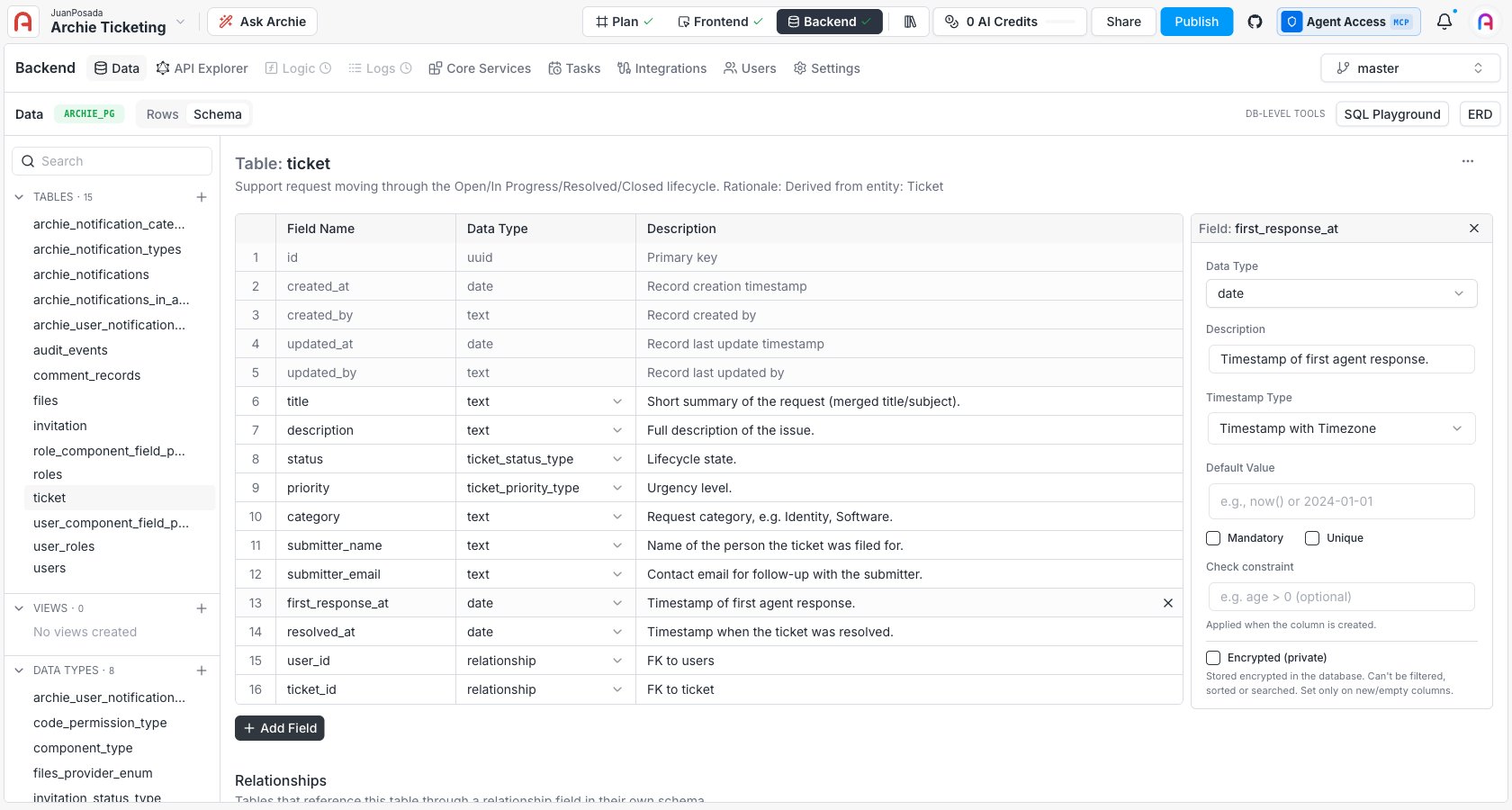
| Option | Description |
| - | - |
| **Name** | The system identifier used in the GraphQL and REST APIs (for example `created_at`, `due_date`). |
| **Description** | An optional internal note explaining the field's purpose. |
| **Timestamp Type** | One of **Date**, **Timestamp with time zone**, or **Timestamp without time zone**. |
| **Default Value** | A value automatically assigned if no data is provided. Often used to capture creation time. |
| **Mandatory** | If on, enforces `NOT NULL` — the record cannot be saved without a date. |
| **Unique** | If on, no two rows can share the same date or timestamp. |
 ## How it appears in the API
The field is generated as a `Date` or `DateTime` scalar in the GraphQL schema, and as an ISO 8601 string in the REST API. See the [GraphQL API Explorer](/docs/features/backend/graphql-api-explorer/overview) for the exact generated types.
## Permissions
Date fields, like any other field, are subject to the per-role read and write rules configured in [Role-Based Access](/docs/features/backend/app-services/role-based-access).
## FAQ
Use **Timestamp with time zone** unless you have a specific reason not to. It stores values in UTC and converts to the viewer's time zone on read, which is what you want for "when did this event happen". Use **without time zone** only for wall-clock times that are the same everywhere (for example, store hours).
Yes. Set the **Default Value** to the current time so new records capture their creation moment automatically.
Existing values are converted automatically where possible — a date becomes the start of that day. Switching the other direction truncates the time component.
A Date field always carries at least a calendar date. If you only need a time of day, store it as **Text** in `HH:MM` format or use a JSONB field with a structured shape.
## How it appears in the API
The field is generated as a `Date` or `DateTime` scalar in the GraphQL schema, and as an ISO 8601 string in the REST API. See the [GraphQL API Explorer](/docs/features/backend/graphql-api-explorer/overview) for the exact generated types.
## Permissions
Date fields, like any other field, are subject to the per-role read and write rules configured in [Role-Based Access](/docs/features/backend/app-services/role-based-access).
## FAQ
Use **Timestamp with time zone** unless you have a specific reason not to. It stores values in UTC and converts to the viewer's time zone on read, which is what you want for "when did this event happen". Use **without time zone** only for wall-clock times that are the same everywhere (for example, store hours).
Yes. Set the **Default Value** to the current time so new records capture their creation moment automatically.
Existing values are converted automatically where possible — a date becomes the start of that day. Switching the other direction truncates the time component.
A Date field always carries at least a calendar date. If you only need a time of day, store it as **Text** in `HH:MM` format or use a JSONB field with a structured shape.