> ## Documentation Index
> Fetch the complete documentation index at: https://archie.com/docs/llms.txt
> Use this file to discover all available pages before exploring further.
# Overview
> Authentication Providers configure who can sign into your app and how — built-in Archie Auth, third-party providers, or both.
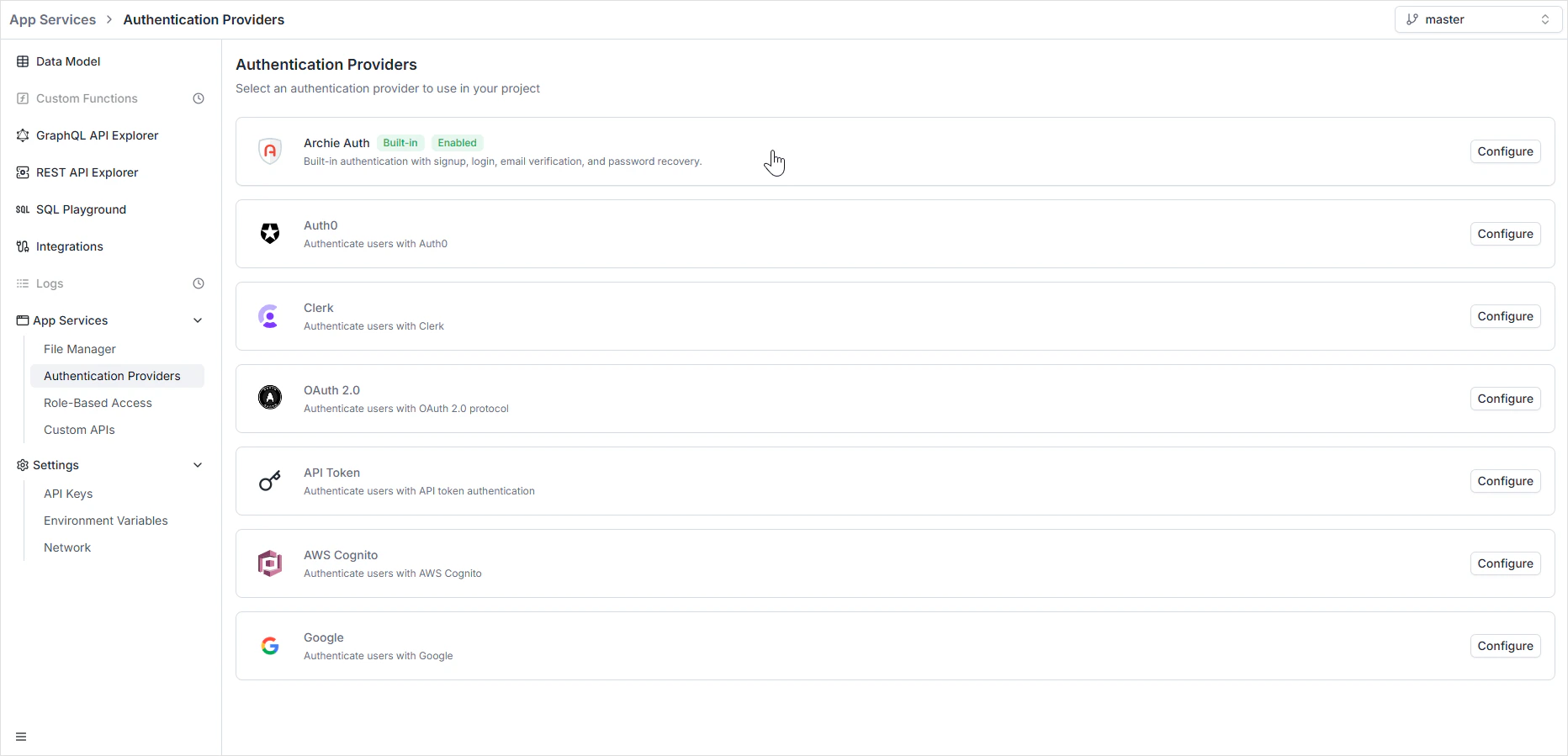
Authentication Providers configure who can sign into your app and how — built-in Archie Auth, third-party providers, or both running side by side. Each provider tells Archie how to verify a credential and turn it into a token; once you have the token, [Role-Based Access](/features/backend/app-services/role-based-access) decides what it's allowed to do.
To open it, navigate to **App Services → Authentication Providers** in the Backend Console.
 ## Per-environment configuration
Auth providers are scoped per environment. Each [environment](/features/backend/environments/overview) keeps its own set of configured providers.
Authentication provider secrets and OAuth credentials are **never copied** when you branch a new environment. Every environment must be configured independently — it's a deliberate isolation boundary so a leaked `dev` secret can't be replayed against `production`.
## Available providers
Built-in email/password auth with user management, password reset, and email verification. The recommended starting point — no external dependency.
Third-party identity platform. Reach for it when you already use Auth0 or need MFA, enterprise SSO, or custom rules.
Modern third-party auth with pre-built UI components. Reach for it when you want sign-in / sign-up UI out of the box.
Generic OAuth 2.0 — any compliant identity provider. Bring your own authorization, token, and userinfo URLs.
Server-to-server auth via static tokens validated against an external endpoint. Use for service accounts and machine-to-machine traffic.
AWS's managed identity service. Reach for it when your stack is AWS-centric and you already run a Cognito User Pool.
Sign in with Google. Useful for SaaS where your audience already has Google accounts.
Java-based enterprise security framework. Use to integrate with existing Shiro realms.
Setup guides for the third-party providers are coming soon. The Archie Auth section is fully documented today.
## Combining providers
Multiple providers can be active simultaneously. Common patterns:
* **End-user auth + service-to-service** — Archie Auth for app users, an API Token provider for backend-to-backend traffic.
* **Social plus password** — Google for social sign-in, Archie Auth for users who prefer email/password.
* **Migration** — keep Auth0 active while migrating users into Archie Auth, then disable Auth0 once the migration completes.
When multiple providers are active, every incoming token is validated against each enabled provider until one accepts it. Routes and queries can be scoped to specific providers if you need finer control.
## Choosing between providers
| Choose | When |
| ---------------- | ------------------------------------------------------------------------------------------------------------------- |
| **Archie Auth** | You don't already have an identity provider and want email/password auth without a dependency. |
| **Auth0** | You already use Auth0, or you need MFA, enterprise SSO, or rule-based authorization beyond what Archie Auth covers. |
| **Clerk** | You want pre-built sign-in UI components and rich user-management UI out of the box. |
| **OAuth 2.0** | Your identity provider doesn't have a dedicated integration but speaks standard OAuth 2.0. |
| **API Token** | You need machine-to-machine auth where the validating service is external. |
| **AWS Cognito** | You run on AWS and already have a Cognito User Pool. |
| **Google** | You only want social login with Google accounts. |
| **Apache Shiro** | You're integrating with an existing Java backend that uses Shiro realms. |
For most projects starting fresh, [Archie Auth](/features/backend/app-services/authentication-providers/archie-auth/overview) is the right default — it ships with the password policy, lockouts, email verification, and admin controls you'd otherwise have to wire up by hand.
## Roles, tokens, and the API surface
Whichever provider you pick, the result is the same: a signed token attached to subsequent requests. The token carries the user's identity and assigned [roles](/features/backend/app-services/role-based-access). The auto-generated [GraphQL](/features/backend/graphql-api-explorer/overview) and [REST](/features/backend/rest-api-explorer/overview) APIs check the token, look up the roles, and enforce the permission matrix on every operation.
For external clients without an interactive user, generate an [API key](/features/backend/settings/api-keys) and attach roles to it directly — no auth provider involved.
## FAQ
Yes. Enable any combination of providers — every active provider validates incoming tokens until one matches. Useful for migrations and for splitting end-user auth from service-to-service traffic.
Deliberately. A copied secret means a `dev` leak compromises `production`. Re-entering credentials per environment makes the security boundary explicit.
[Archie Auth](/features/backend/app-services/authentication-providers/archie-auth/overview) for most cases — email/password with admin controls and no external dependency. Switch to a third-party provider later if you outgrow it; the rest of the platform doesn't care which provider issued the token.
The auth provider verifies the credential and issues a token. [RBAC](/features/backend/app-services/role-based-access) decides what that token can do. A user can be authenticated but unauthorized for a specific operation — that's a `403`, not a `401`.
Use either an [API Key](/features/backend/settings/api-keys) (managed inside Archie) or the API Token provider (validated against an external endpoint). Both attach to roles and bypass interactive auth flows.
## Per-environment configuration
Auth providers are scoped per environment. Each [environment](/features/backend/environments/overview) keeps its own set of configured providers.
Authentication provider secrets and OAuth credentials are **never copied** when you branch a new environment. Every environment must be configured independently — it's a deliberate isolation boundary so a leaked `dev` secret can't be replayed against `production`.
## Available providers
Built-in email/password auth with user management, password reset, and email verification. The recommended starting point — no external dependency.
Third-party identity platform. Reach for it when you already use Auth0 or need MFA, enterprise SSO, or custom rules.
Modern third-party auth with pre-built UI components. Reach for it when you want sign-in / sign-up UI out of the box.
Generic OAuth 2.0 — any compliant identity provider. Bring your own authorization, token, and userinfo URLs.
Server-to-server auth via static tokens validated against an external endpoint. Use for service accounts and machine-to-machine traffic.
AWS's managed identity service. Reach for it when your stack is AWS-centric and you already run a Cognito User Pool.
Sign in with Google. Useful for SaaS where your audience already has Google accounts.
Java-based enterprise security framework. Use to integrate with existing Shiro realms.
Setup guides for the third-party providers are coming soon. The Archie Auth section is fully documented today.
## Combining providers
Multiple providers can be active simultaneously. Common patterns:
* **End-user auth + service-to-service** — Archie Auth for app users, an API Token provider for backend-to-backend traffic.
* **Social plus password** — Google for social sign-in, Archie Auth for users who prefer email/password.
* **Migration** — keep Auth0 active while migrating users into Archie Auth, then disable Auth0 once the migration completes.
When multiple providers are active, every incoming token is validated against each enabled provider until one accepts it. Routes and queries can be scoped to specific providers if you need finer control.
## Choosing between providers
| Choose | When |
| ---------------- | ------------------------------------------------------------------------------------------------------------------- |
| **Archie Auth** | You don't already have an identity provider and want email/password auth without a dependency. |
| **Auth0** | You already use Auth0, or you need MFA, enterprise SSO, or rule-based authorization beyond what Archie Auth covers. |
| **Clerk** | You want pre-built sign-in UI components and rich user-management UI out of the box. |
| **OAuth 2.0** | Your identity provider doesn't have a dedicated integration but speaks standard OAuth 2.0. |
| **API Token** | You need machine-to-machine auth where the validating service is external. |
| **AWS Cognito** | You run on AWS and already have a Cognito User Pool. |
| **Google** | You only want social login with Google accounts. |
| **Apache Shiro** | You're integrating with an existing Java backend that uses Shiro realms. |
For most projects starting fresh, [Archie Auth](/features/backend/app-services/authentication-providers/archie-auth/overview) is the right default — it ships with the password policy, lockouts, email verification, and admin controls you'd otherwise have to wire up by hand.
## Roles, tokens, and the API surface
Whichever provider you pick, the result is the same: a signed token attached to subsequent requests. The token carries the user's identity and assigned [roles](/features/backend/app-services/role-based-access). The auto-generated [GraphQL](/features/backend/graphql-api-explorer/overview) and [REST](/features/backend/rest-api-explorer/overview) APIs check the token, look up the roles, and enforce the permission matrix on every operation.
For external clients without an interactive user, generate an [API key](/features/backend/settings/api-keys) and attach roles to it directly — no auth provider involved.
## FAQ
Yes. Enable any combination of providers — every active provider validates incoming tokens until one matches. Useful for migrations and for splitting end-user auth from service-to-service traffic.
Deliberately. A copied secret means a `dev` leak compromises `production`. Re-entering credentials per environment makes the security boundary explicit.
[Archie Auth](/features/backend/app-services/authentication-providers/archie-auth/overview) for most cases — email/password with admin controls and no external dependency. Switch to a third-party provider later if you outgrow it; the rest of the platform doesn't care which provider issued the token.
The auth provider verifies the credential and issues a token. [RBAC](/features/backend/app-services/role-based-access) decides what that token can do. A user can be authenticated but unauthorized for a specific operation — that's a `403`, not a `401`.
Use either an [API Key](/features/backend/settings/api-keys) (managed inside Archie) or the API Token provider (validated against an external endpoint). Both attach to roles and bypass interactive auth flows.