> ## Documentation Index
> Fetch the complete documentation index at: https://archie.com/docs/llms.txt
> Use this file to discover all available pages before exploring further.
# Role-Based Access
> Define roles and the read, write, update, and delete permissions they grant on every table — including row-level filtering.
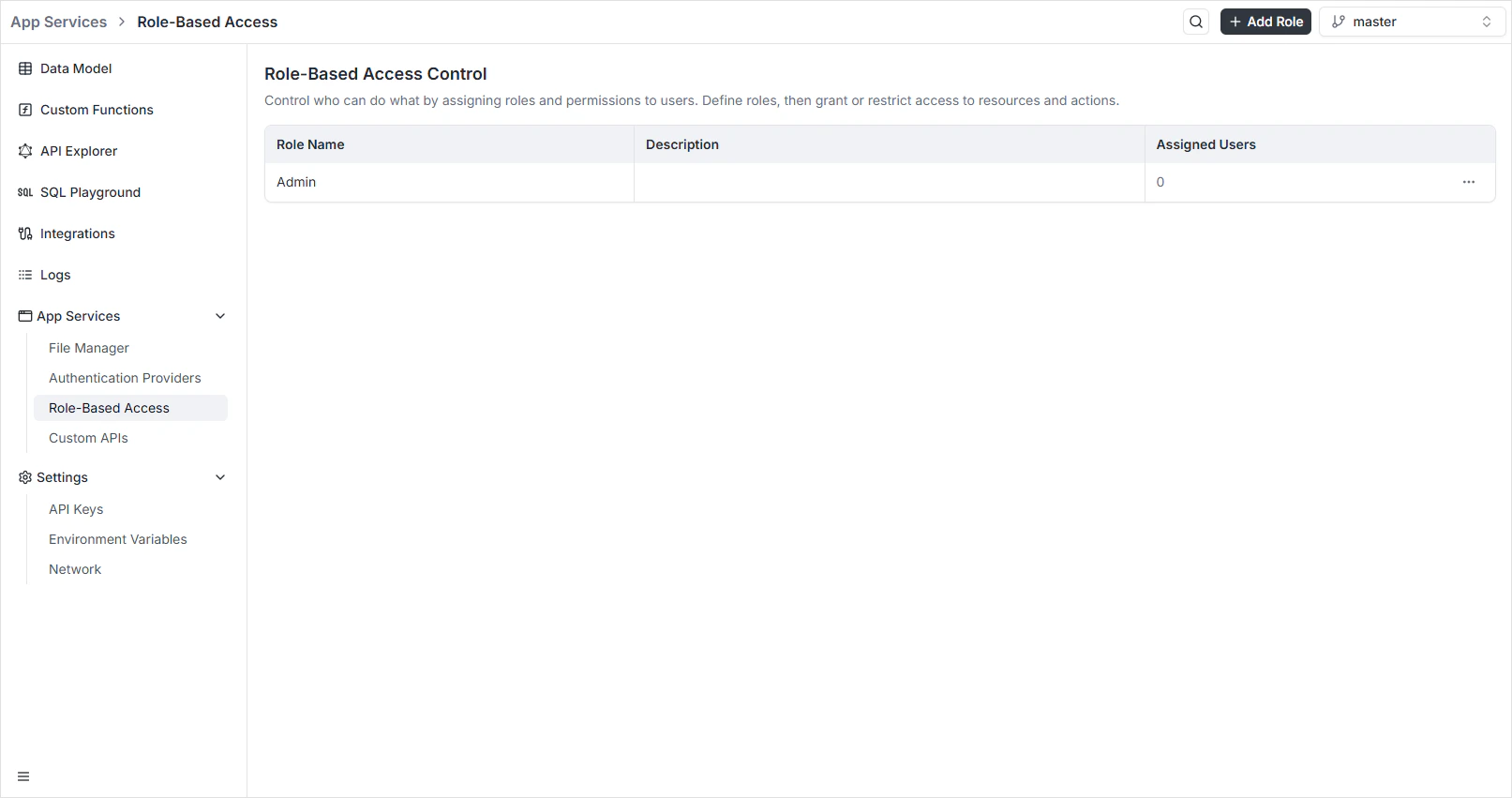
Role-Based Access is where you decide what every authenticated user (or [API key](/features/backend/settings/api-keys)) is allowed to do. You create roles, attach **Read / Write / Update / Delete** permissions per resource, and optionally add a row-level filter that scopes queries to a subset of records. The auto-generated [GraphQL](/features/backend/graphql-api-explorer/overview) and [REST](/features/backend/rest-api-explorer/overview) APIs enforce those rules on every request.
To open it, navigate to **App Services → Role-Based Access** in the Backend Console.
 ## Per-environment scoping
Roles are scoped per environment. Each [environment](/features/backend/environments/overview) has its own `roles` table — switch environments and the roles list reflects whatever's defined there. Branching an environment copies the roles in the source environment as a starting point.
## Creating a role
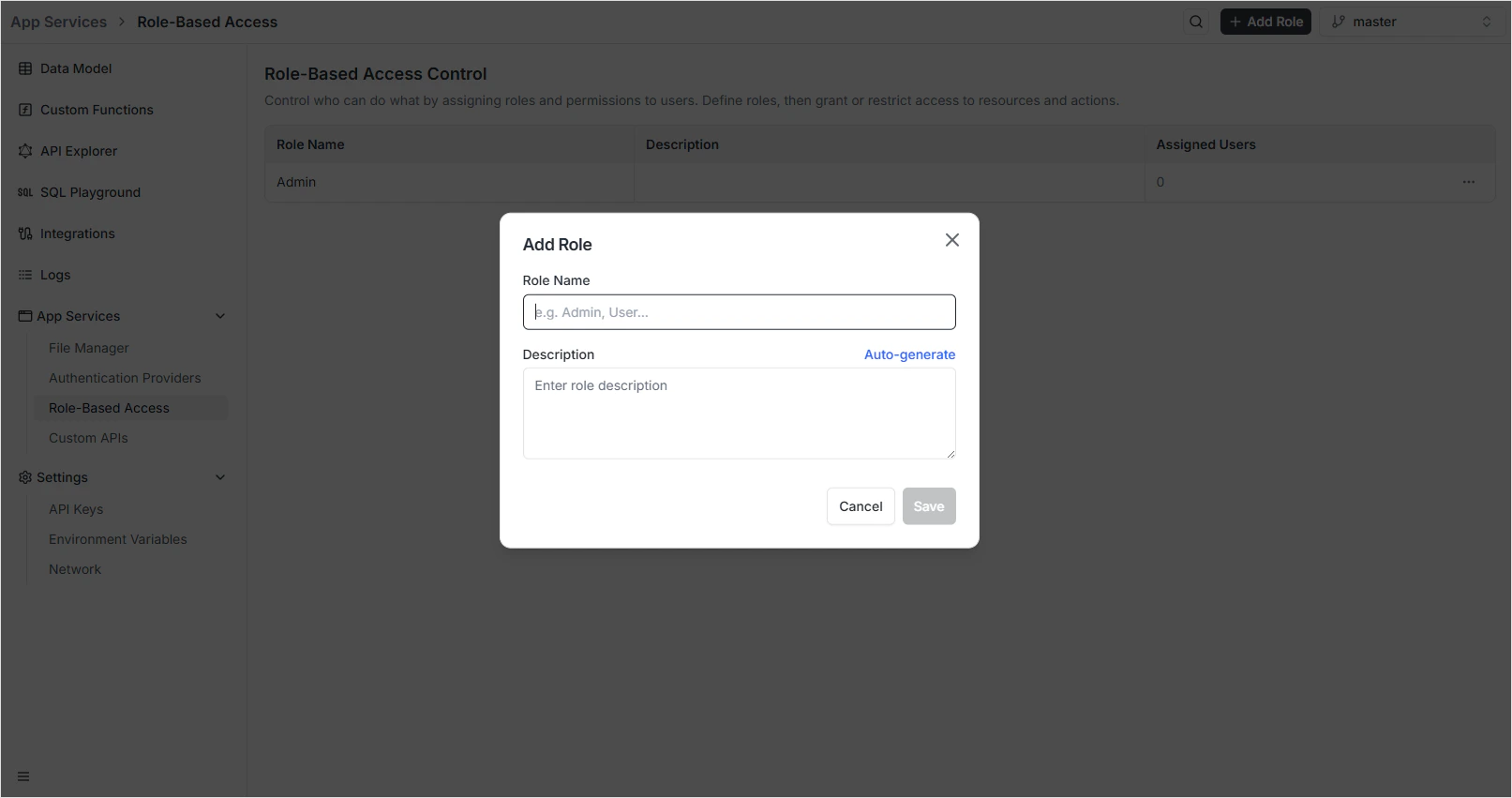
The button sits in the top-right of the dashboard.
Use a unique, snake-cased identifier — `admin`, `editor`, `content_manager`. The name appears in API responses and tokens.
Briefly describe what the role can do. Click **Auto-generate** to have Archie propose one based on the name.
The role appears in the dashboard with zero assigned users and a blank permissions grid.
## Per-environment scoping
Roles are scoped per environment. Each [environment](/features/backend/environments/overview) has its own `roles` table — switch environments and the roles list reflects whatever's defined there. Branching an environment copies the roles in the source environment as a starting point.
## Creating a role
The button sits in the top-right of the dashboard.
Use a unique, snake-cased identifier — `admin`, `editor`, `content_manager`. The name appears in API responses and tokens.
Briefly describe what the role can do. Click **Auto-generate** to have Archie propose one based on the name.
The role appears in the dashboard with zero assigned users and a blank permissions grid.
 ## The permission matrix
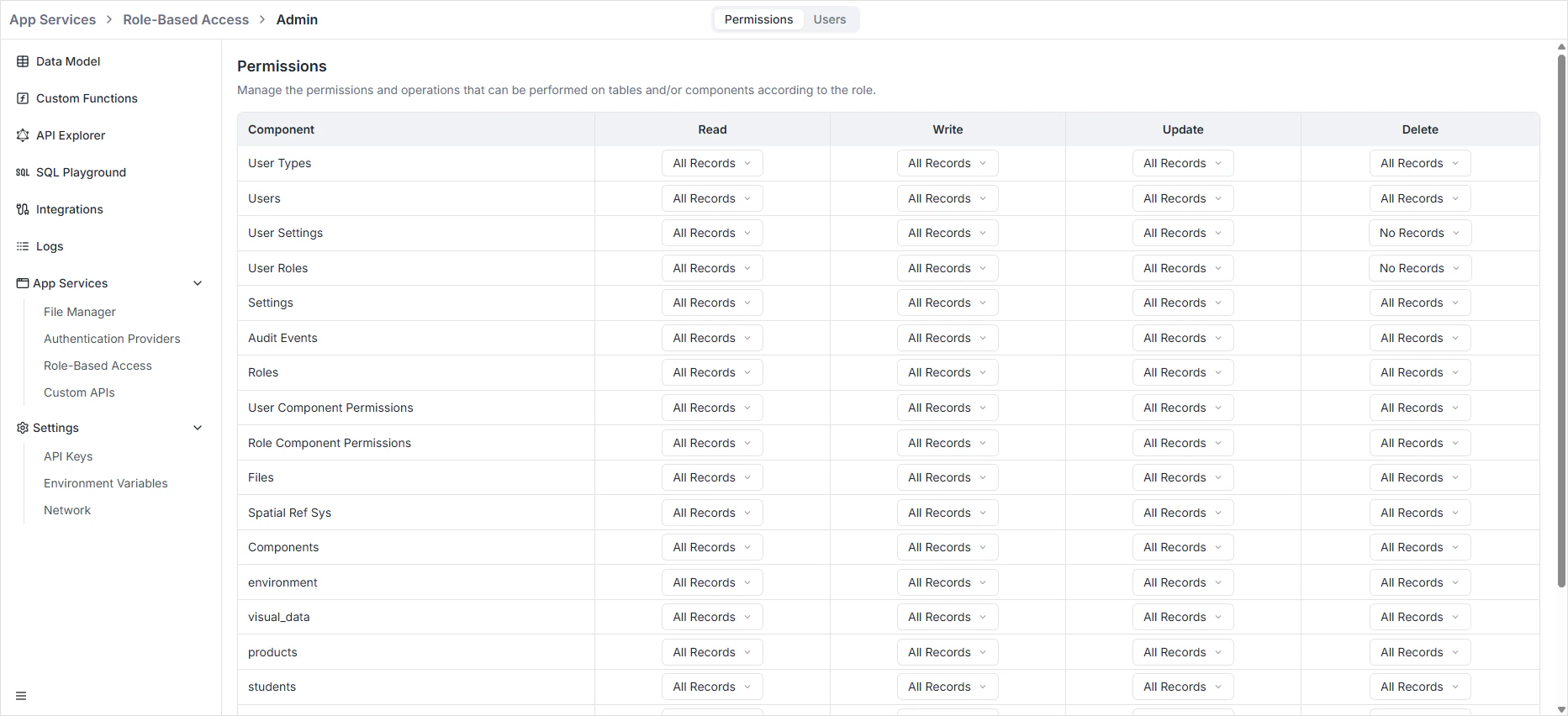
Click any role from the dashboard to open its permissions grid. For every resource — every [table](/features/backend/data-model/tables) and every system resource — you toggle four operations:
| Operation | What it grants |
| ---------- | -------------------------------------------------------- |
| **Read** | Run list and single-record queries against the resource. |
| **Write** | Create new records (POST/`createXxx`). |
| **Update** | Modify existing records (PATCH/`updateXxx`). |
| **Delete** | Remove records (DELETE/`deleteXxx`). |
The grid is the contract for both APIs — there is no separate "API permission" layer. Granting **Read** on `orders` means a holder of this role can run `query { orders { ... } }` on GraphQL and `GET /api/rest/orders` on REST. Without it, both fail with `403 Forbidden`.
## The permission matrix
Click any role from the dashboard to open its permissions grid. For every resource — every [table](/features/backend/data-model/tables) and every system resource — you toggle four operations:
| Operation | What it grants |
| ---------- | -------------------------------------------------------- |
| **Read** | Run list and single-record queries against the resource. |
| **Write** | Create new records (POST/`createXxx`). |
| **Update** | Modify existing records (PATCH/`updateXxx`). |
| **Delete** | Remove records (DELETE/`deleteXxx`). |
The grid is the contract for both APIs — there is no separate "API permission" layer. Granting **Read** on `orders` means a holder of this role can run `query { orders { ... } }` on GraphQL and `GET /api/rest/orders` on REST. Without it, both fail with `403 Forbidden`.
 ## Row-level filtering
The **Filter** column on each row scopes queries to a subset of records. Common pattern: an `employee` role that can only read records they own:
```text theme={null}
owner_id = $userId
```
Filters expose the authenticated user as `$userId` and the active environment as `$environment`. The filter is appended to the WHERE clause on every read, update, and delete, so a query like `GET /api/rest/orders` returns only the matching subset.
| Use case | Filter expression |
| ------------------------- | --------------------------------------------------------------- |
| Owner-scoped reads | `owner_id = $userId` |
| Tenant-scoped reads | `workspace_id = $workspaceId` |
| Archived rows excluded | `archived = false` |
| Active records this month | `is_active = true AND created_at >= now() - interval '30 days'` |
Filters apply on top of the base permission. A role with **Read** on `orders` and a filter `owner_id = $userId` can read its own orders; without **Read**, the filter doesn't grant anything.
## Roles and authenticated users
When a user signs in via an [authentication provider](/features/backend/app-services/authentication-providers/overview), the issued token carries their assigned role(s). Every subsequent request is checked against those roles. Users can hold multiple roles; permissions are the union.
Assignment happens in two places:
* **In the dashboard** — open a user record (or the auth provider's user list) and pick roles from the dropdown.
* **At signup** — pass a `roleId` to the [Archie Auth signup endpoint](/features/backend/app-services/authentication-providers/archie-auth/rest-api). New users without an explicit role get the project's default.
## Roles and API keys
External clients calling the API use tokens generated under [Backend → Settings → API Keys](/features/backend/settings/api-keys). When you create a key you attach one or more roles to it, and the key is bound to those permissions for its entire lifetime.
To rotate the role attached to a key, generate a new key with the new role and revoke the old one. Roles assigned at key-creation time can't be edited later — that's deliberate, because a long-lived key whose permissions silently change is a security trap.
## Cross-cutting effects
| Surface | What RBAC enforces |
| -------------------------------------------------------------- | ----------------------------------------------------------------------------------------------------------------- |
| [GraphQL API](/features/backend/graphql-api-explorer/overview) | Filters records the role can't read out of every list and nested query; rejects mutations the role can't perform. |
| [REST API](/features/backend/rest-api-explorer/overview) | Same checks on every endpoint, returning `403 Forbidden` on disallowed operations. |
| [File Manager](/features/backend/app-services/file-manager) | Per-role rules on `/api/rest/files` upload, download, delete. |
| [Custom APIs](/features/backend/app-services/custom-apis) | Custom routes inherit auth and can be protected per-role. |
| [Data Viewer](/features/backend/data-model/data-viewer) | Hides fields and rows the role can't read; disables edit/delete actions the role can't perform. |
## FAQ
Each project has a default role assigned at signup time. By convention it's a low-privilege role like `member` — verified users get baseline read access to user-facing tables, nothing more. Configure it in the auth provider settings.
Custom functions run with their own service identity. They can read and write tables regardless of the caller's role — that's typically the right place to enforce business-level rules that go beyond CRUD. The auto-generated APIs always enforce RBAC.
`owner_id = $userId` on the `orders` table means the user only sees their own orders, even when they call `GET /api/rest/orders` with no filter. The platform appends the filter to the WHERE clause server-side. The user can't override it.
The union — the most permissive across all assigned roles. If `editor` has Read on `posts` and `moderator` has Update, a user with both can read and update.
Yes — branching an environment optionally copies the roles. After branching, edits to roles in either environment are independent.
## Row-level filtering
The **Filter** column on each row scopes queries to a subset of records. Common pattern: an `employee` role that can only read records they own:
```text theme={null}
owner_id = $userId
```
Filters expose the authenticated user as `$userId` and the active environment as `$environment`. The filter is appended to the WHERE clause on every read, update, and delete, so a query like `GET /api/rest/orders` returns only the matching subset.
| Use case | Filter expression |
| ------------------------- | --------------------------------------------------------------- |
| Owner-scoped reads | `owner_id = $userId` |
| Tenant-scoped reads | `workspace_id = $workspaceId` |
| Archived rows excluded | `archived = false` |
| Active records this month | `is_active = true AND created_at >= now() - interval '30 days'` |
Filters apply on top of the base permission. A role with **Read** on `orders` and a filter `owner_id = $userId` can read its own orders; without **Read**, the filter doesn't grant anything.
## Roles and authenticated users
When a user signs in via an [authentication provider](/features/backend/app-services/authentication-providers/overview), the issued token carries their assigned role(s). Every subsequent request is checked against those roles. Users can hold multiple roles; permissions are the union.
Assignment happens in two places:
* **In the dashboard** — open a user record (or the auth provider's user list) and pick roles from the dropdown.
* **At signup** — pass a `roleId` to the [Archie Auth signup endpoint](/features/backend/app-services/authentication-providers/archie-auth/rest-api). New users without an explicit role get the project's default.
## Roles and API keys
External clients calling the API use tokens generated under [Backend → Settings → API Keys](/features/backend/settings/api-keys). When you create a key you attach one or more roles to it, and the key is bound to those permissions for its entire lifetime.
To rotate the role attached to a key, generate a new key with the new role and revoke the old one. Roles assigned at key-creation time can't be edited later — that's deliberate, because a long-lived key whose permissions silently change is a security trap.
## Cross-cutting effects
| Surface | What RBAC enforces |
| -------------------------------------------------------------- | ----------------------------------------------------------------------------------------------------------------- |
| [GraphQL API](/features/backend/graphql-api-explorer/overview) | Filters records the role can't read out of every list and nested query; rejects mutations the role can't perform. |
| [REST API](/features/backend/rest-api-explorer/overview) | Same checks on every endpoint, returning `403 Forbidden` on disallowed operations. |
| [File Manager](/features/backend/app-services/file-manager) | Per-role rules on `/api/rest/files` upload, download, delete. |
| [Custom APIs](/features/backend/app-services/custom-apis) | Custom routes inherit auth and can be protected per-role. |
| [Data Viewer](/features/backend/data-model/data-viewer) | Hides fields and rows the role can't read; disables edit/delete actions the role can't perform. |
## FAQ
Each project has a default role assigned at signup time. By convention it's a low-privilege role like `member` — verified users get baseline read access to user-facing tables, nothing more. Configure it in the auth provider settings.
Custom functions run with their own service identity. They can read and write tables regardless of the caller's role — that's typically the right place to enforce business-level rules that go beyond CRUD. The auto-generated APIs always enforce RBAC.
`owner_id = $userId` on the `orders` table means the user only sees their own orders, even when they call `GET /api/rest/orders` with no filter. The platform appends the filter to the WHERE clause server-side. The user can't override it.
The union — the most permissive across all assigned roles. If `editor` has Read on `posts` and `moderator` has Update, a user with both can read and update.
Yes — branching an environment optionally copies the roles. After branching, edits to roles in either environment are independent.