> ## Documentation Index
> Fetch the complete documentation index at: https://archie.com/docs/llms.txt
> Use this file to discover all available pages before exploring further.
# Boolean field
> Boolean fields store true / false flags. Use them for yes/no, on/off, and any binary state.
A Boolean field stores a binary value: `true` or `false`. It's the most efficient way to model yes/no, on/off, or any state with exactly two possibilities. In the data viewer, the field renders as a switch.
## When to use it
Reach for a Boolean when a record can be in exactly one of two states with no expectation that you'll add a third. Common examples:
* `is_active`, `is_archived`, `is_published`
* `has_paid`, `has_verified_email`, `has_consented`
* `accepts_marketing`, `is_admin`, `is_default`
If a field could grow into a third state ("draft", "in review"), use an [inline enum](/features/backend/data-model/fields/inline-enum) or a reusable [Data Type](/features/backend/data-model/data-types) instead.
## Configuration options
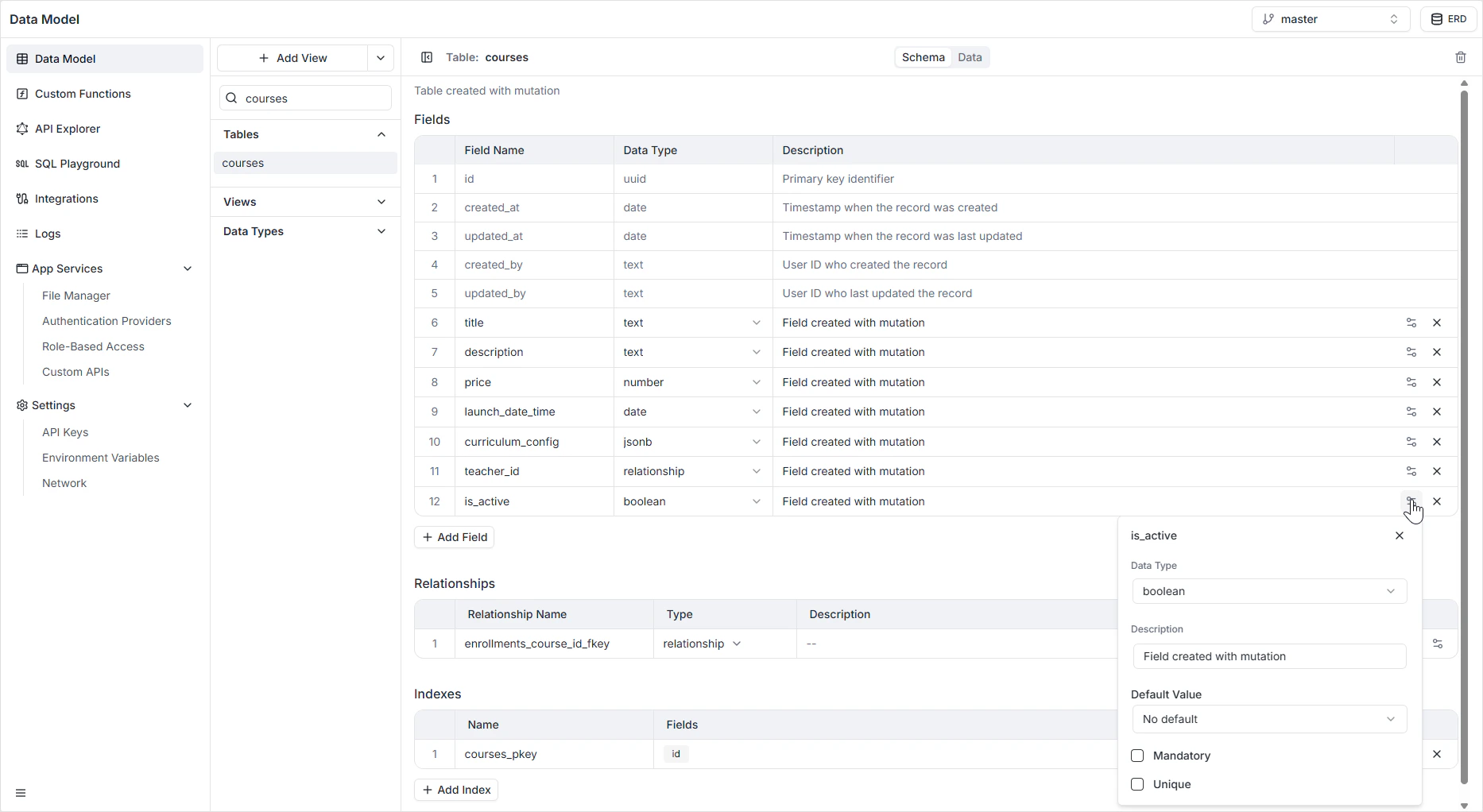
| Option | Description |
| ----------------- | ---------------------------------------------------------------------------------------------------------------------- |
| **Name** | The system identifier used in the GraphQL and REST APIs (for example `is_enrolled`). |
| **Description** | An optional internal note explaining the flag's purpose. |
| **Default Value** | One of: **No default** (the field starts `null`), **True**, or **False**. |
| **Mandatory** | If on, the field cannot be `null` — every record must commit to `true` or `false`. |
| **Unique** | If on, only one row in the table can hold each value. Rarely useful for booleans, since it caps the table at two rows. |
 ## How it appears in the API
The field is generated as a non-nullable `Boolean!` in GraphQL when **Mandatory** is on, and as a nullable `Boolean` otherwise. The same shape is reflected in the auto-generated REST endpoints. See the [GraphQL API Explorer](/features/backend/graphql-api-explorer/overview) to inspect the generated queries and mutations.
## Permissions
Whether a Boolean field is readable or writable per role is governed in [Role-Based Access](/features/backend/app-services/role-based-access), not on the field itself.
## FAQ
Set **Mandatory** on and **Default Value** to **False**. That way every record is guaranteed to be either true or false, with new records defaulting to false.
Leave **Mandatory** off — `null` then represents "unknown". For anything more expressive, use an [inline enum](/features/backend/data-model/fields/inline-enum) instead.
Almost never. A unique Boolean limits the table to at most two rows total (one `true`, one `false`). It exists for completeness, not because it's a common pattern.
A new row pre-fills the switch to the default state. You can override it before saving the row.
## How it appears in the API
The field is generated as a non-nullable `Boolean!` in GraphQL when **Mandatory** is on, and as a nullable `Boolean` otherwise. The same shape is reflected in the auto-generated REST endpoints. See the [GraphQL API Explorer](/features/backend/graphql-api-explorer/overview) to inspect the generated queries and mutations.
## Permissions
Whether a Boolean field is readable or writable per role is governed in [Role-Based Access](/features/backend/app-services/role-based-access), not on the field itself.
## FAQ
Set **Mandatory** on and **Default Value** to **False**. That way every record is guaranteed to be either true or false, with new records defaulting to false.
Leave **Mandatory** off — `null` then represents "unknown". For anything more expressive, use an [inline enum](/features/backend/data-model/fields/inline-enum) instead.
Almost never. A unique Boolean limits the table to at most two rows total (one `true`, one `false`). It exists for completeness, not because it's a common pattern.
A new row pre-fills the switch to the default state. You can override it before saving the row.