> ## Documentation Index
> Fetch the complete documentation index at: https://archie.com/docs/llms.txt
> Use this file to discover all available pages before exploring further.
# JSONB field
> JSONB fields store structured JSON objects and arrays. Validated on write, indexable, and queryable by key.
A JSONB field stores structured JSON — objects, arrays, or scalars wrapped in JSON. Unlike a Text field, the database validates that the input is well-formed JSON before saving and stores it in a binary format that allows efficient indexing and key-level queries.
## JSONB vs. JSON
The field offers two storage modes:
| Mode | What it does | When to use it |
| ------------------- | ----------------------------------------------------------------------------------------------------------------------------------------- | --------------------------------------------------------- |
| **JSONB** (default) | Decomposes and stores JSON in a binary format. Supports indexing (GIN). Faster to query. | Almost always. Anything you'll filter or read often. |
| **JSON** | Stores an exact copy of the input text, preserving whitespace and key order. Faster to write, slower to read (re-parsed on every access). | Only when you need to round-trip the input byte-for-byte. |
If you're not sure, pick **JSONB**.
## When to use a JSONB field
Reach for JSONB when the data is structured but the structure varies between records or evolves frequently:
* **Configuration and settings** — `{"notifications": true, "theme": "dark"}`
* **Third-party API payloads** — raw responses from Stripe, webhooks, logging payloads
* **Dynamic attributes** — products where a T-shirt has `size` and `color` but a laptop has `ram` and `cpu`
* **Lists of strings or numbers** — `["tag1", "tag2", "tag3"]`
If the shape is fixed and shared across all records, model it with explicit fields and relationships instead. JSONB shines when columns would balloon or change too often.
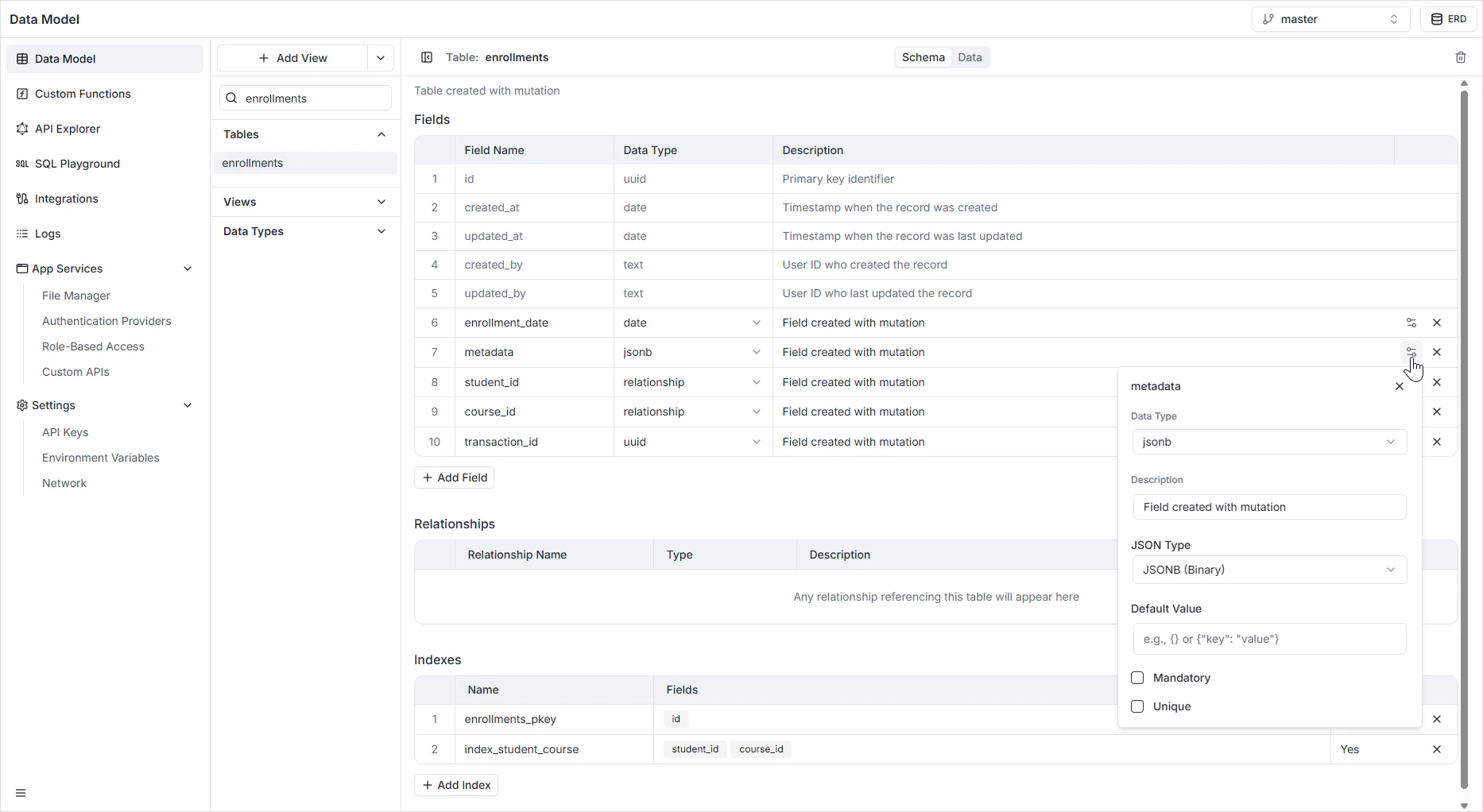
## Configuration options
| Option | Description |
| ----------------- | -------------------------------------------------------------------------------------------------------- |
| **Name** | The system identifier used in the GraphQL and REST APIs (for example `metadata`, `settings`, `payload`). |
| **JSON Type** | **JSONB** (binary, default) or **JSON** (raw text). |
| **Description** | An optional internal note describing the schema or purpose of the data. |
| **Default Value** | A valid JSON object or array assigned if no value is provided (for example `{}`). |
| **Mandatory** | If on, the record cannot be saved without valid JSON. |
| **Unique** | If on, no two rows can share the exact same content. |
 ## How it appears in the API
The field is generated as a `JSON` scalar in GraphQL and as a nested JSON value in the REST API. Clients receive and send the value as a structured object, not a string. See the [GraphQL API Explorer](/features/backend/graphql-api-explorer/overview) to inspect the generated types.
## Permissions
JSONB fields are subject to the per-role read and write rules configured in [Role-Based Access](/features/backend/app-services/role-based-access).
## FAQ
JSONB is decomposed and indexable, which makes filtering on keys (for example, `attributes->>'color' = 'blue'`) fast. Plain JSON has to re-parse the value on every read. The only reason to pick JSON is if you need to preserve the exact input text — whitespace, duplicate keys, key order.
When the shape varies between records or changes often. If every record has the same fields and you'll filter on them, model them as explicit columns — you'll get better validation and clearer types in the generated APIs.
Yes. Use the SQL Playground or a custom function for ad-hoc PostgreSQL JSONB operators (`->`, `->>`, `@>`). The auto-generated GraphQL API surfaces the value as a whole; deep filtering inside JSONB is best done with a [view](/features/backend/data-model/views) or a custom resolver.
Exact binary equality of the stored JSONB value. Note that JSONB normalizes — `{"a":1,"b":2}` and `{"b":2,"a":1}` collapse to the same value, but `{"a":1}` is distinct from `{"a":1,"b":null}`.
`{}` for an object-shaped field or `[]` for an array. Defaults keep clients from having to handle `null` in addition to "empty".
## How it appears in the API
The field is generated as a `JSON` scalar in GraphQL and as a nested JSON value in the REST API. Clients receive and send the value as a structured object, not a string. See the [GraphQL API Explorer](/features/backend/graphql-api-explorer/overview) to inspect the generated types.
## Permissions
JSONB fields are subject to the per-role read and write rules configured in [Role-Based Access](/features/backend/app-services/role-based-access).
## FAQ
JSONB is decomposed and indexable, which makes filtering on keys (for example, `attributes->>'color' = 'blue'`) fast. Plain JSON has to re-parse the value on every read. The only reason to pick JSON is if you need to preserve the exact input text — whitespace, duplicate keys, key order.
When the shape varies between records or changes often. If every record has the same fields and you'll filter on them, model them as explicit columns — you'll get better validation and clearer types in the generated APIs.
Yes. Use the SQL Playground or a custom function for ad-hoc PostgreSQL JSONB operators (`->`, `->>`, `@>`). The auto-generated GraphQL API surfaces the value as a whole; deep filtering inside JSONB is best done with a [view](/features/backend/data-model/views) or a custom resolver.
Exact binary equality of the stored JSONB value. Note that JSONB normalizes — `{"a":1,"b":2}` and `{"b":2,"a":1}` collapse to the same value, but `{"a":1}` is distinct from `{"a":1,"b":null}`.
`{}` for an object-shaped field or `[]` for an array. Defaults keep clients from having to handle `null` in addition to "empty".