> ## Documentation Index
> Fetch the complete documentation index at: https://archie.com/docs/llms.txt
> Use this file to discover all available pages before exploring further.
# Number field
> Number fields store integers, decimals, and floats. Pick the number type to match the precision and range you need.
A Number field stores numerical data. Picking the right number type matters: it controls how much storage the field uses, what range of values it can hold, and whether decimal precision is exact or approximate.
## Number types
| Type | Stores | Range / precision | Use it for |
| ------------------------------- | --------------------- | ----------------------------------------- | ----------------------------------------------------------------------------- |
| **Small Integer (SMALLINT)** | Whole numbers | -32,768 to 32,767 | Small counters, ages, ratings on a fixed scale. |
| **Integer (INT)** | Whole numbers | About -2.1 billion to 2.1 billion | Most counts, quantities, scores. The default choice. |
| **Big Integer (BIGINT)** | Whole numbers | About -9.2 quintillion to 9.2 quintillion | High-traffic counters, very large IDs, file sizes in bytes. |
| **Float (REAL)** | Decimal numbers | \~6 decimal digits of precision | Weights, percentages, scientific measurements where some imprecision is fine. |
| **Numeric / Decimal (NUMERIC)** | Exact decimal numbers | Configurable precision and scale | Money, anything that must round predictably. |
| **Double Precision** | Decimal numbers | \~15 decimal digits of precision | Coordinates, scientific calculations needing more precision than Float. |
For monetary values, always use **Numeric / Decimal**. Floats and doubles are approximate and accumulate rounding errors. A `0.1 + 0.2 = 0.30000000000000004` mistake in a financial column is a real problem.
## Configuration options
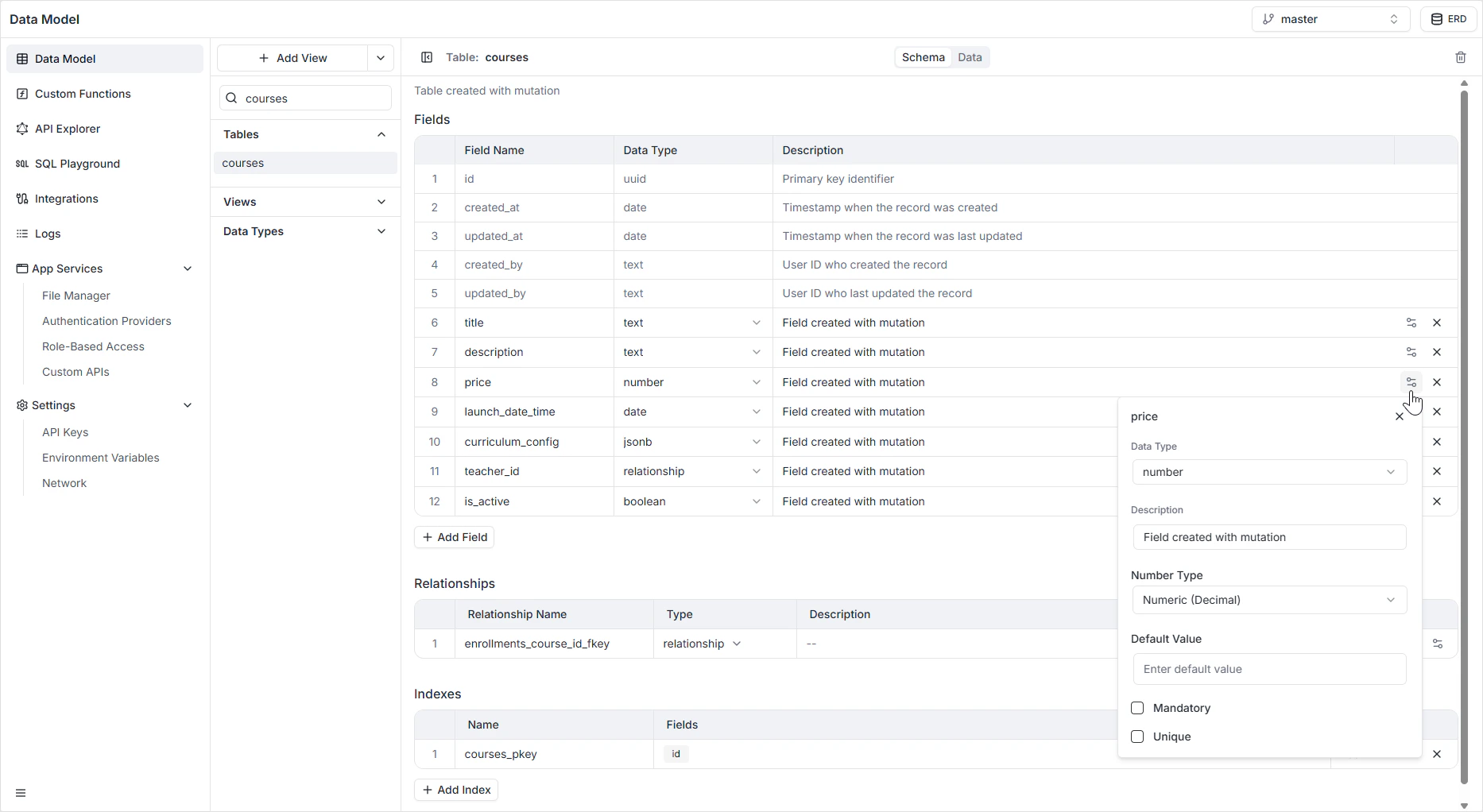
| Option | Description |
| ----------------- | --------------------------------------------------------------------------------------------------- |
| **Name** | The system identifier used in the GraphQL and REST APIs (for example `price`, `quantity`, `score`). |
| **Description** | An optional internal note explaining the field's purpose. |
| **Number Type** | One of the six types listed above. |
| **Default Value** | A value automatically assigned if no number is provided (for example `0` for a counter). |
| **Mandatory** | If on, the record cannot be saved without a number. |
| **Unique** | If on, no two rows can share the same number. Useful for serial numbers or rankings. |
 ## How it appears in the API
Integer types are exposed as `Int` in GraphQL. Float, Double Precision, and Numeric are exposed as `Float` (or a custom `Decimal` scalar where exactness matters). See the [GraphQL API Explorer](/features/backend/graphql-api-explorer/overview) for the generated schema.
## Permissions
Number fields obey the per-role read and write rules configured in [Role-Based Access](/features/backend/app-services/role-based-access).
## FAQ
**Numeric / Decimal**. It stores exact values with a configurable precision and scale. Floats and doubles are inexact and will produce rounding errors over time.
For most app data, **Integer** is more than enough (about ±2.1 billion). Reach for **Big Integer** only when you genuinely expect very large counts or are storing identifiers that exceed Integer's range.
Both are approximate. **Float** has about 6 digits of precision; **Double Precision** has about 15. Use Double when you need more precision; Float when storage size matters and 6 digits is enough.
Yes. Existing values are auto-converted where the new type can hold them. Narrowing the type — for example, from Integer to Small Integer — will fail if any value is out of range.
## How it appears in the API
Integer types are exposed as `Int` in GraphQL. Float, Double Precision, and Numeric are exposed as `Float` (or a custom `Decimal` scalar where exactness matters). See the [GraphQL API Explorer](/features/backend/graphql-api-explorer/overview) for the generated schema.
## Permissions
Number fields obey the per-role read and write rules configured in [Role-Based Access](/features/backend/app-services/role-based-access).
## FAQ
**Numeric / Decimal**. It stores exact values with a configurable precision and scale. Floats and doubles are inexact and will produce rounding errors over time.
For most app data, **Integer** is more than enough (about ±2.1 billion). Reach for **Big Integer** only when you genuinely expect very large counts or are storing identifiers that exceed Integer's range.
Both are approximate. **Float** has about 6 digits of precision; **Double Precision** has about 15. Use Double when you need more precision; Float when storage size matters and 6 digits is enough.
Yes. Existing values are auto-converted where the new type can hold them. Narrowing the type — for example, from Integer to Small Integer — will fail if any value is out of range.