> ## Documentation Index
> Fetch the complete documentation index at: https://archie.com/docs/llms.txt
> Use this file to discover all available pages before exploring further.
# Relationship field
> Relationship fields connect two tables with a foreign key. Archie generates the inverse query in GraphQL automatically.
A Relationship field links a record in one table to a record (or records) in another. Unlike a UUID or a Text field, it doesn't store a free-form value — it stores a reference to a row in another table and enforces that the reference is valid.
When you add a relationship, Archie creates the corresponding inverse field on the other side automatically, so the connection works in both directions. The auto-generated GraphQL API exposes the relationship as a nested field, letting you fetch a record and its related records in a single query.
## Cardinality
| Cardinality | What it means | Example |
| --------------- | -------------------------------------------------------------------------------- | --------------------------------------------------------------------------- |
| **One-to-One** | Record A links to exactly one Record B, and vice versa. | `User` ↔ `Profile` — every user has one profile. |
| **One-to-Many** | Record A is linked to many Record Bs, but each Record B belongs to one Record A. | `Author` ↔ `Books` — an author writes many books, each book has one author. |
For more on choosing cardinality and how Archie models many-to-many connections, see [Relationships](/features/backend/data-model/relationships).
## Creating a relationship
On the **Schema** tab, click **+ Add Field** and pick **Relationship** from the type dropdown.
Click the configuration icon on the right side of the field row to open the relationship settings.
Choose the target table from the **Related Table** dropdown.
Pick **One-to-One** or **One-to-Many** based on how the two tables relate.
Turn on **Mandatory** if every record must have a related record. Leave it off to allow the link to be empty.
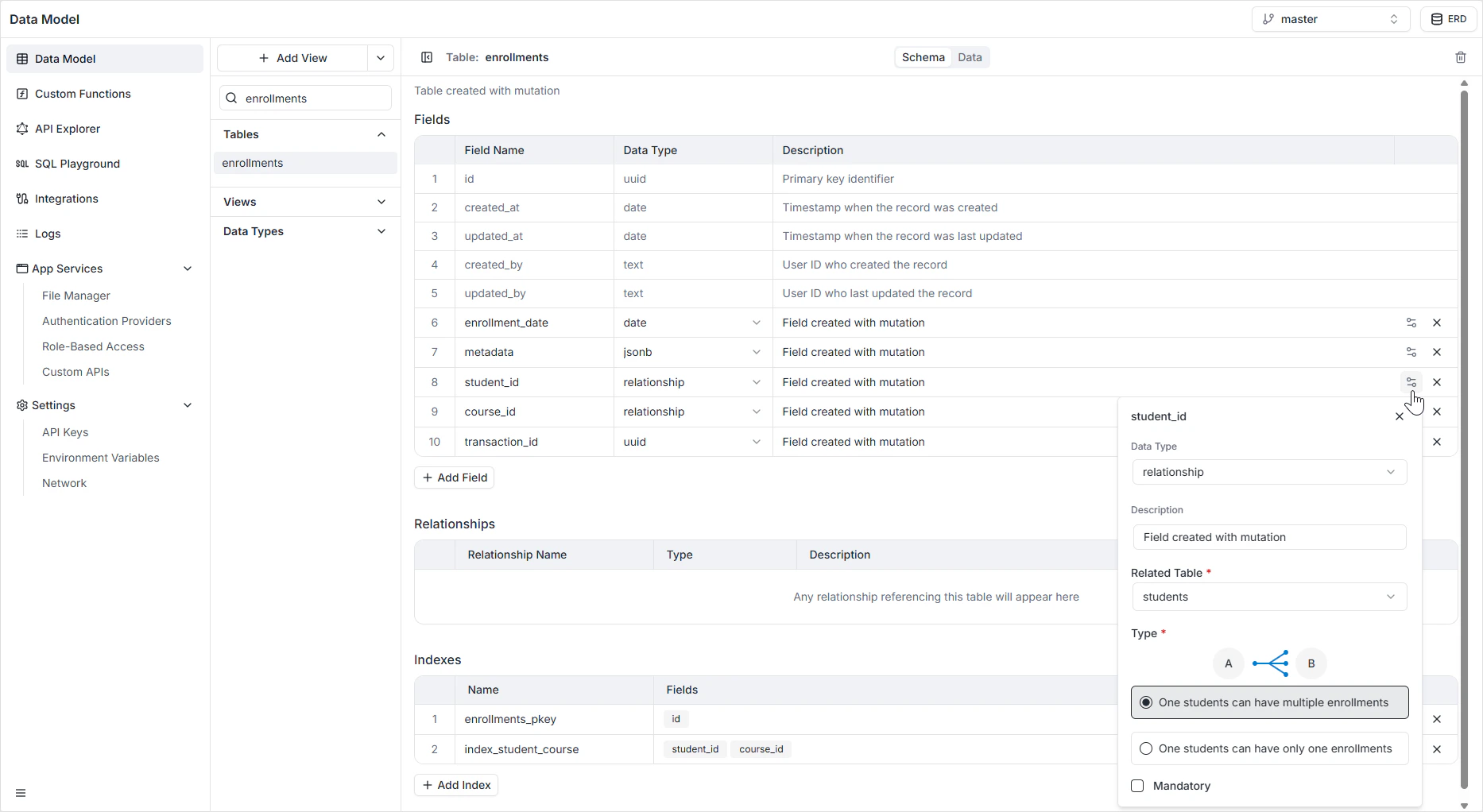 When you create a relationship, Archie automatically adds the inverse field on the related table — for example, adding `author` on `books` also exposes `books` as a nested field on `author`. You don't need to set it up on both sides.
## How it appears in the API
The relationship is exposed in GraphQL as a nested field. Given an `Author` with a one-to-many `books` relationship, you can fetch both in one query:
```graphql theme={null}
query {
author(id: "...") {
id
name
books {
id
title
}
}
}
```
The reverse direction works too — given a book, you can resolve its author:
```graphql theme={null}
query {
book(id: "...") {
id
title
author {
id
name
}
}
}
```
See the [GraphQL API Explorer](/features/backend/graphql-api-explorer/overview) to inspect the generated queries and mutations for your specific tables.
## Permissions
A relationship field is governed by the read and write permissions on **both** tables. A user has to be able to read a related table for it to appear in the nested query. Configure this in [Role-Based Access](/features/backend/app-services/role-based-access).
## FAQ
Create a join table with one-to-many relationships pointing to each side. For example, a `students_courses` join table linking `students` and `courses` gives you the many-to-many. See [Relationships](/features/backend/data-model/relationships) for the full pattern.
The default behavior is to prevent the deletion when there are referencing rows. See [Relationships](/features/backend/data-model/relationships) for cascade and nullify options.
No. The relationship field is itself the foreign key — it stores the reference to the related table's primary key.
Yes. Rename the field on the **Schema** tab. The GraphQL nested field name updates immediately; any client code that uses the old name will need to be updated.
When you create a relationship, Archie automatically adds the inverse field on the related table — for example, adding `author` on `books` also exposes `books` as a nested field on `author`. You don't need to set it up on both sides.
## How it appears in the API
The relationship is exposed in GraphQL as a nested field. Given an `Author` with a one-to-many `books` relationship, you can fetch both in one query:
```graphql theme={null}
query {
author(id: "...") {
id
name
books {
id
title
}
}
}
```
The reverse direction works too — given a book, you can resolve its author:
```graphql theme={null}
query {
book(id: "...") {
id
title
author {
id
name
}
}
}
```
See the [GraphQL API Explorer](/features/backend/graphql-api-explorer/overview) to inspect the generated queries and mutations for your specific tables.
## Permissions
A relationship field is governed by the read and write permissions on **both** tables. A user has to be able to read a related table for it to appear in the nested query. Configure this in [Role-Based Access](/features/backend/app-services/role-based-access).
## FAQ
Create a join table with one-to-many relationships pointing to each side. For example, a `students_courses` join table linking `students` and `courses` gives you the many-to-many. See [Relationships](/features/backend/data-model/relationships) for the full pattern.
The default behavior is to prevent the deletion when there are referencing rows. See [Relationships](/features/backend/data-model/relationships) for cascade and nullify options.
No. The relationship field is itself the foreign key — it stores the reference to the related table's primary key.
Yes. Rename the field on the **Schema** tab. The GraphQL nested field name updates immediately; any client code that uses the old name will need to be updated.