> ## Documentation Index
> Fetch the complete documentation index at: https://archie.com/docs/llms.txt
> Use this file to discover all available pages before exploring further.
# Indexes
> Indexes speed up lookups on frequently queried fields and can enforce uniqueness across one or more columns.
An index is a database structure that speeds up lookups on a column (or combination of columns). Without an index, the database has to scan every row of a table to find matches; with one, it can jump directly to the relevant rows.
Indexes also have a second job: **unique indexes** prevent duplicate values from being inserted, which is the standard way to enforce uniqueness across multiple columns at once.
## When to add an index
Add an index when:
* A column is frequently used in lookups — for example, an `email` field on `users` or a `slug` on `posts`.
* A column is used to filter or sort large result sets.
* You need to enforce uniqueness across a combination of columns (use a unique index).
Don't add indexes preemptively to every column. Indexes take up storage and slow down inserts and updates. Add them when a query is measurably slow, or when uniqueness needs to be enforced.
## Unique vs. non-unique
| Type | What it does |
| -------------------- | ----------------------------------------------------------------------------------------------------------------- |
| **Non-unique index** | Speeds up lookups on the indexed columns. Multiple rows can share the same value. |
| **Unique index** | Speeds up lookups **and** rejects inserts or updates that would create a duplicate combination of indexed values. |
A unique index across `(workspace_id, slug)` is the right way to say "every workspace must have unique slugs, but slugs can repeat across workspaces."
## Creating an index
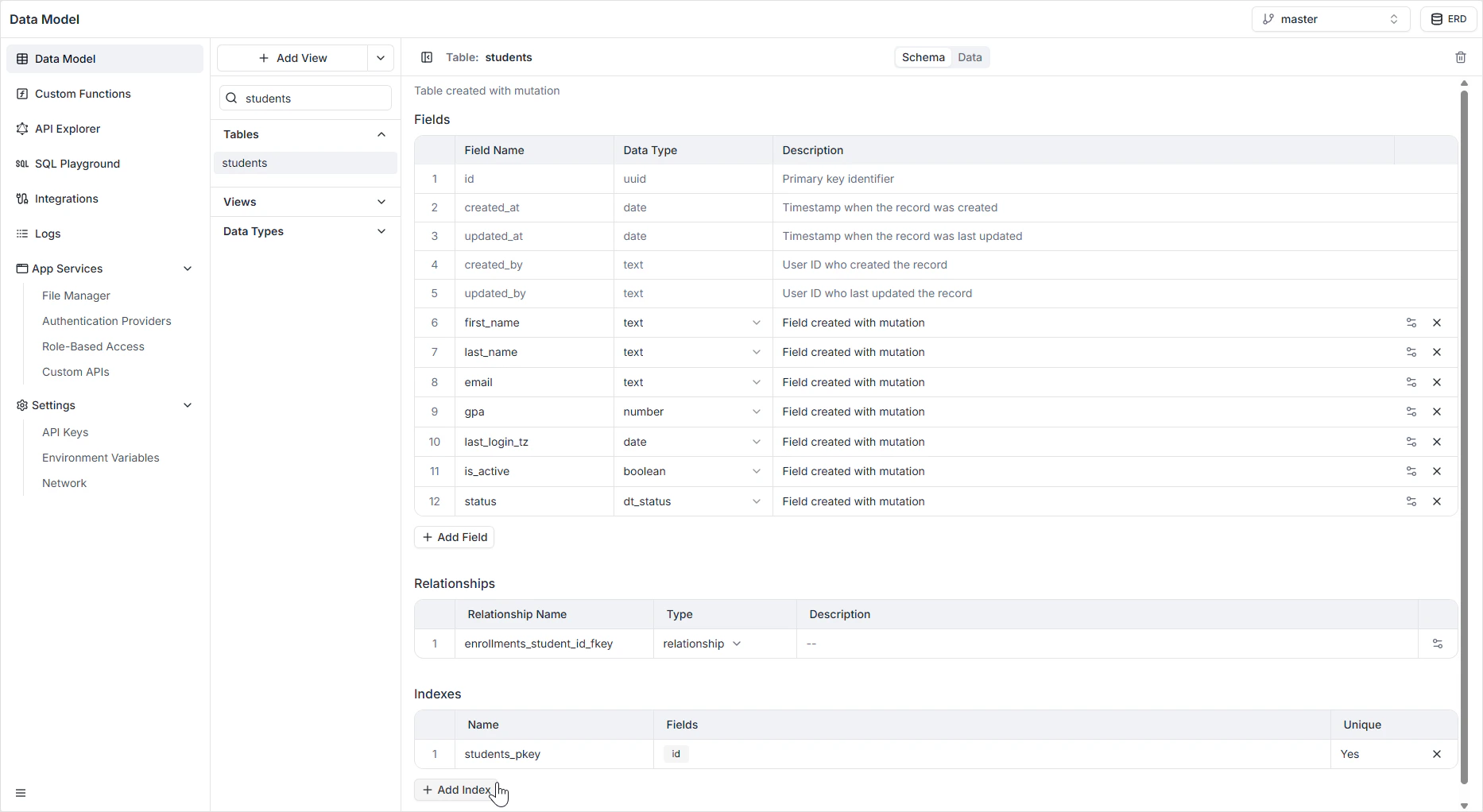
Click the table you want to index in the Data Model sidebar.
Below the field list, the **Indexes** section lists every index already configured on the table.
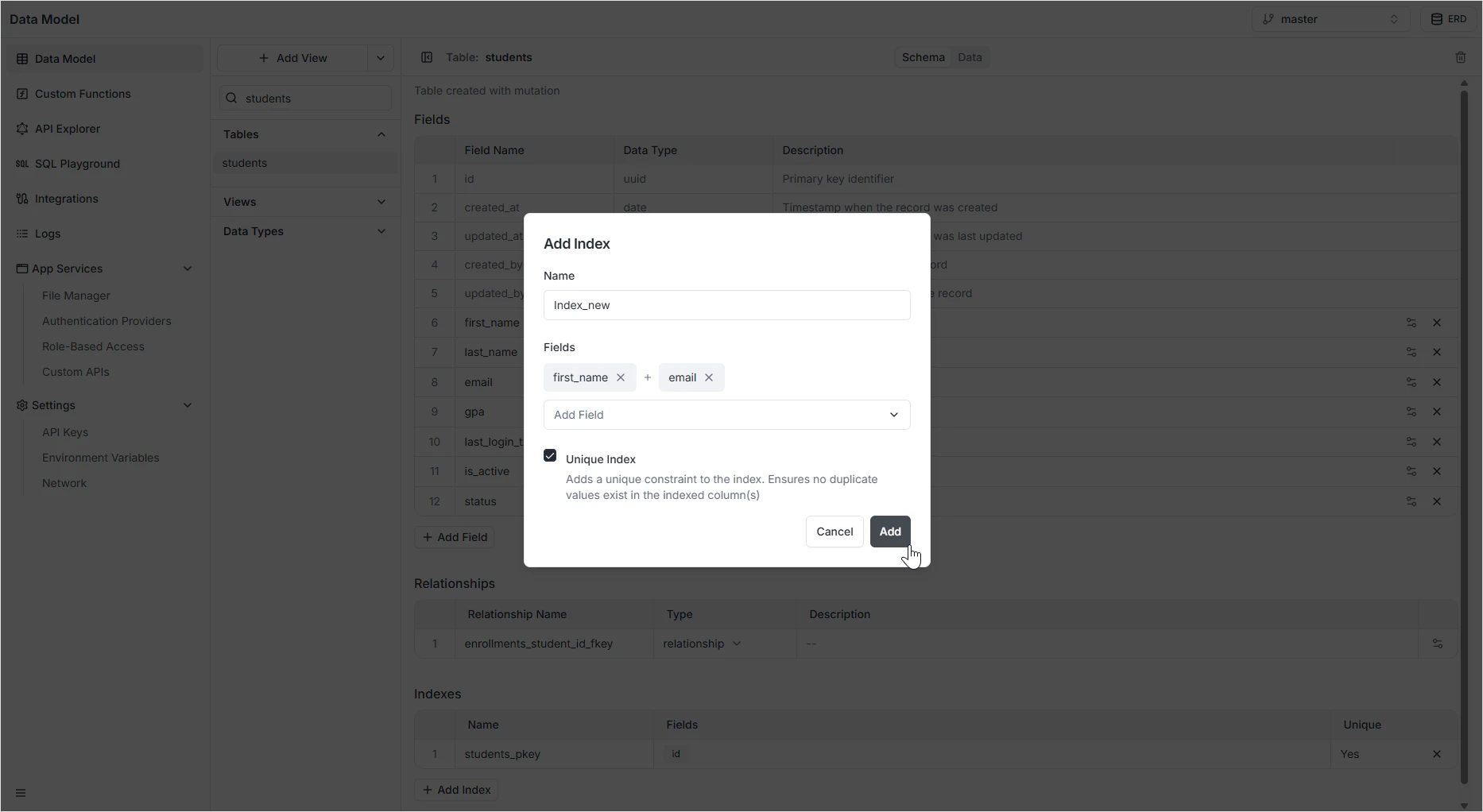
The index configuration dialog opens.
Select one or more fields. The order matters for multi-column indexes — pick the order that matches how you'll query.
Toggle the **Unique** option if you want the index to enforce uniqueness across the chosen fields.
Index names cannot contain spaces. Use snake\_case (for example, `users_email_unique`).
Click **Add**. The index is created immediately. For large tables, the operation runs in the background.
 ## Single-column vs. multi-column indexes
A single-column index speeds up lookups on that column alone:
* `users.email` — speeds up `WHERE email = '...'`
A multi-column index speeds up lookups on the **leading** columns. The order matters:
* An index on `(workspace_id, created_at)` speeds up queries that filter by `workspace_id`, by `workspace_id` and `created_at`, but not queries that filter only by `created_at`.
When in doubt, start with a single-column index. Add a multi-column index only when your query plan shows it would help.
## Unique constraints on a single field vs. a unique index
A field with **Unique** turned on is implemented under the hood as a single-column unique index. The two are equivalent for a single column — use the field-level toggle for clarity. Use the **Indexes** panel when:
* Uniqueness needs to span multiple columns.
* You want to add a non-unique index for performance.
* You're naming the index explicitly to match a convention.
## How it appears in the API
Indexes don't change the shape of the GraphQL or REST APIs — they affect query performance only. Unique indexes do surface as validation: inserts and updates that would violate uniqueness are rejected with a clear error.
## Permissions
Indexes are infrastructure-level — they don't have their own permissions. Read and write permissions on the underlying table are governed by [Role-Based Access](/features/backend/app-services/role-based-access).
## FAQ
No. Indexes have a write cost — every insert and update has to maintain them. Add an index when a query is measurably slow on real data. Most tables only need a few indexes.
Yes for multi-column indexes. The index helps queries that filter on a leading prefix of the columns. `(a, b)` helps `WHERE a = ?` and `WHERE a = ? AND b = ?`, but not `WHERE b = ?` alone.
A field with **Unique** on is a unique index on that single column. The Indexes panel is the right tool when uniqueness spans multiple columns.
Yes. The Indexes panel lists each index with a delete control. Dropping a non-unique index is safe; dropping a unique index removes the uniqueness guarantee.
Indexes on small tables are nearly instant. On large tables, the database creates the index without blocking reads or writes — but creation itself takes longer.
## Single-column vs. multi-column indexes
A single-column index speeds up lookups on that column alone:
* `users.email` — speeds up `WHERE email = '...'`
A multi-column index speeds up lookups on the **leading** columns. The order matters:
* An index on `(workspace_id, created_at)` speeds up queries that filter by `workspace_id`, by `workspace_id` and `created_at`, but not queries that filter only by `created_at`.
When in doubt, start with a single-column index. Add a multi-column index only when your query plan shows it would help.
## Unique constraints on a single field vs. a unique index
A field with **Unique** turned on is implemented under the hood as a single-column unique index. The two are equivalent for a single column — use the field-level toggle for clarity. Use the **Indexes** panel when:
* Uniqueness needs to span multiple columns.
* You want to add a non-unique index for performance.
* You're naming the index explicitly to match a convention.
## How it appears in the API
Indexes don't change the shape of the GraphQL or REST APIs — they affect query performance only. Unique indexes do surface as validation: inserts and updates that would violate uniqueness are rejected with a clear error.
## Permissions
Indexes are infrastructure-level — they don't have their own permissions. Read and write permissions on the underlying table are governed by [Role-Based Access](/features/backend/app-services/role-based-access).
## FAQ
No. Indexes have a write cost — every insert and update has to maintain them. Add an index when a query is measurably slow on real data. Most tables only need a few indexes.
Yes for multi-column indexes. The index helps queries that filter on a leading prefix of the columns. `(a, b)` helps `WHERE a = ?` and `WHERE a = ? AND b = ?`, but not `WHERE b = ?` alone.
A field with **Unique** on is a unique index on that single column. The Indexes panel is the right tool when uniqueness spans multiple columns.
Yes. The Indexes panel lists each index with a delete control. Dropping a non-unique index is safe; dropping a unique index removes the uniqueness guarantee.
Indexes on small tables are nearly instant. On large tables, the database creates the index without blocking reads or writes — but creation itself takes longer.