> ## Documentation Index
> Fetch the complete documentation index at: https://archie.com/docs/llms.txt
> Use this file to discover all available pages before exploring further.
# Views
> A View is a virtual table defined by a saved SQL SELECT query. Views appear in the GraphQL API like a standard table.
A View is a virtual table whose contents are defined by a saved SQL `SELECT` query. Views don't store data themselves — every time you query a view, the underlying SQL runs and returns a fresh result set built from the real tables.
In the auto-generated GraphQL API, a view appears as a regular table. Clients query it the same way they query any other table.
## When to use a View
| Use case | Why a View fits |
| -------------------------- | --------------------------------------------------------------------------------------------------------- |
| **Pre-joined data** | Combine `students`, `courses`, and `grades` into one query so the frontend doesn't have to. |
| **Computed columns** | Concatenate `first_name` and `last_name` into a `full_name` field without storing it. |
| **Hide sensitive columns** | Expose only public fields to a specific API consumer; keep internal IDs and PII in the underlying tables. |
| **Live aggregates** | Use `COUNT`, `SUM`, or `AVG` to surface statistics like "monthly sales total" automatically. |
| **Schema stability** | Refactor underlying tables and update the view's SQL to keep the API output stable for clients. |
If you need to run ad-hoc queries that don't need to be exposed in the API, use the [SQL Playground](/features/backend/sql-playground) instead.
## Creating a View
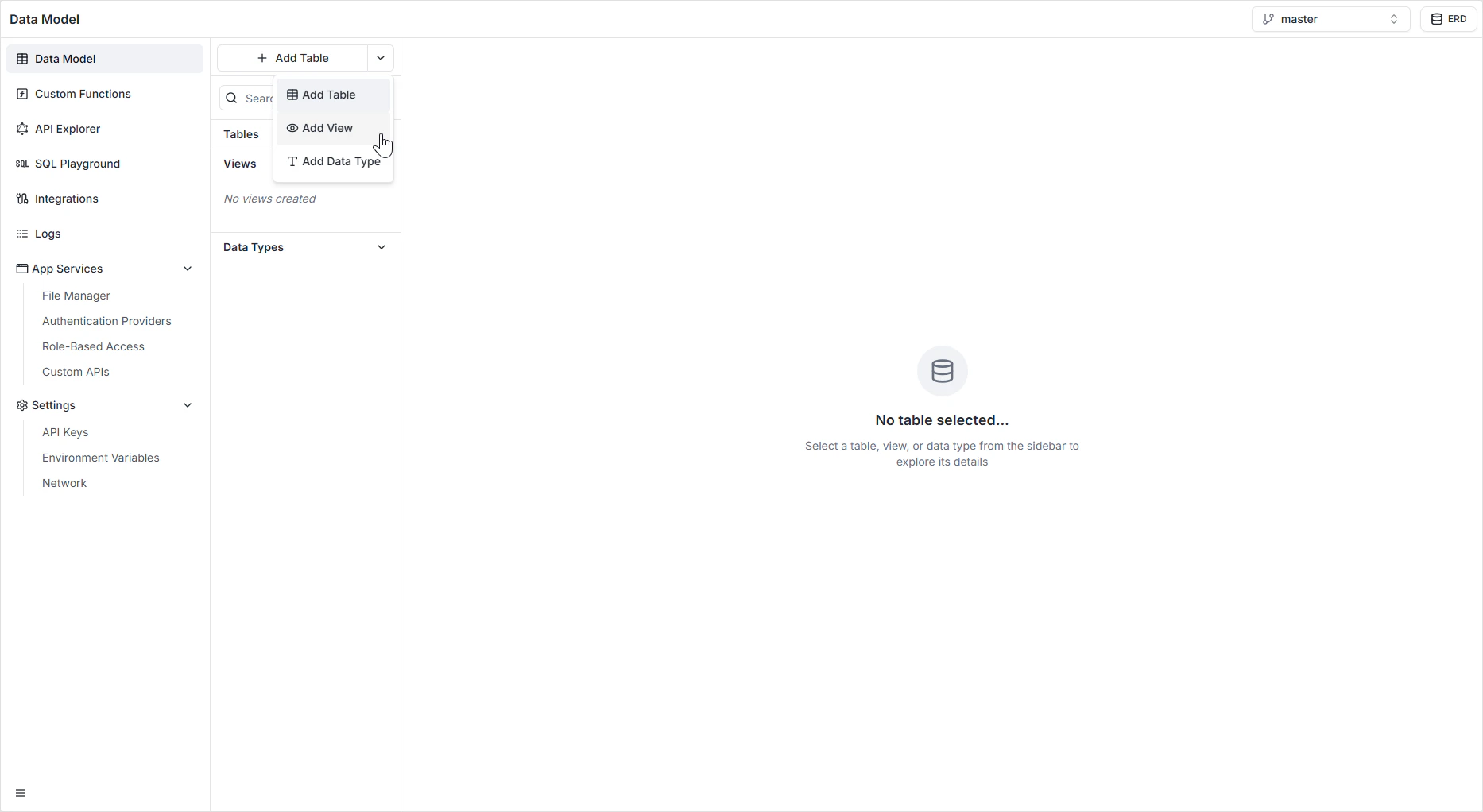
Find the **+ Add Table** button at the top of the sidebar.
Click the dropdown arrow next to **+ Add Table**.
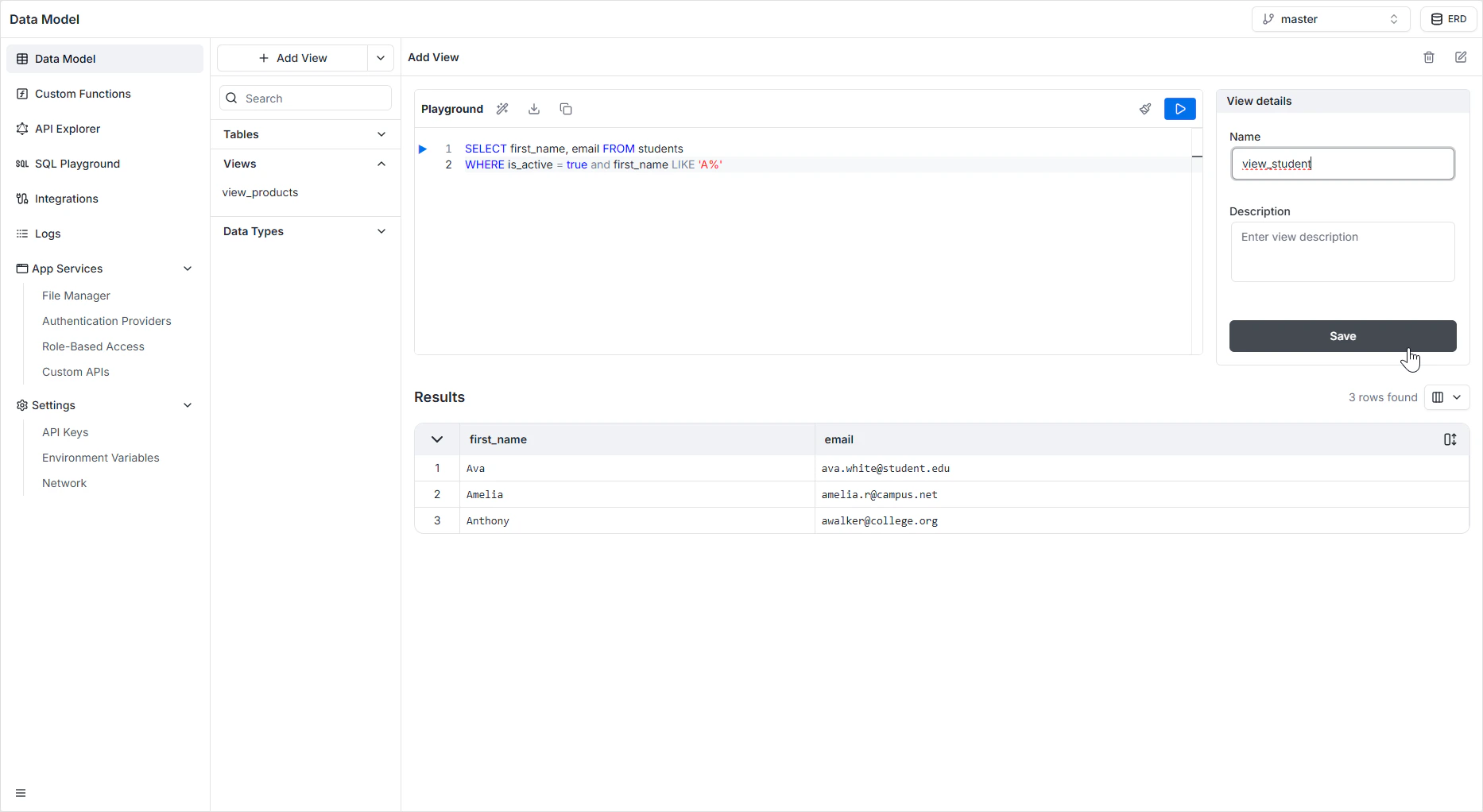
Select **Add View**. The view editor opens with an inline SQL playground.
Enter a `SELECT` statement that returns the columns and rows you want to expose.
```sql theme={null}
SELECT first_name, last_name, email
FROM students
WHERE is_active = true;
```
Click the **Play** button (▶) to preview the result set immediately. This catches syntax errors and verifies the shape of the output before saving.
Enter a unique system identifier (for example `active_students`). This name is what the GraphQL API exposes. Add a description so your team knows what the view returns.
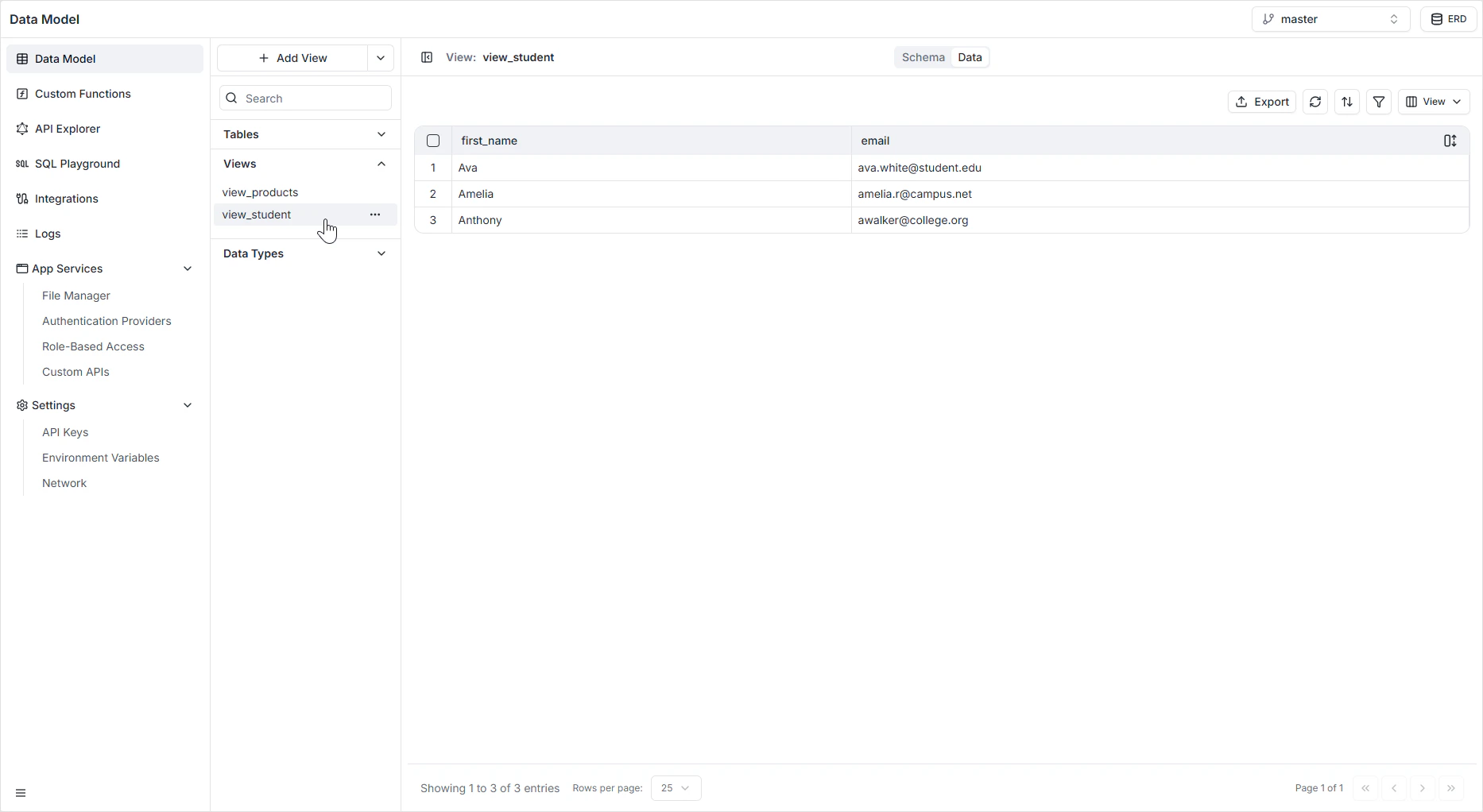
The view appears in the **Views** section of the sidebar and becomes immediately queryable.
 ## Editing a View
To modify an existing view's query or description:
1. Open the **Views** section in the **Data Model** sidebar.
2. Hover the view you want to edit and click the pencil icon.
3. Update the SQL or metadata, run the query to verify, and save.
## Editing a View
To modify an existing view's query or description:
1. Open the **Views** section in the **Data Model** sidebar.
2. Hover the view you want to edit and click the pencil icon.
3. Update the SQL or metadata, run the query to verify, and save.
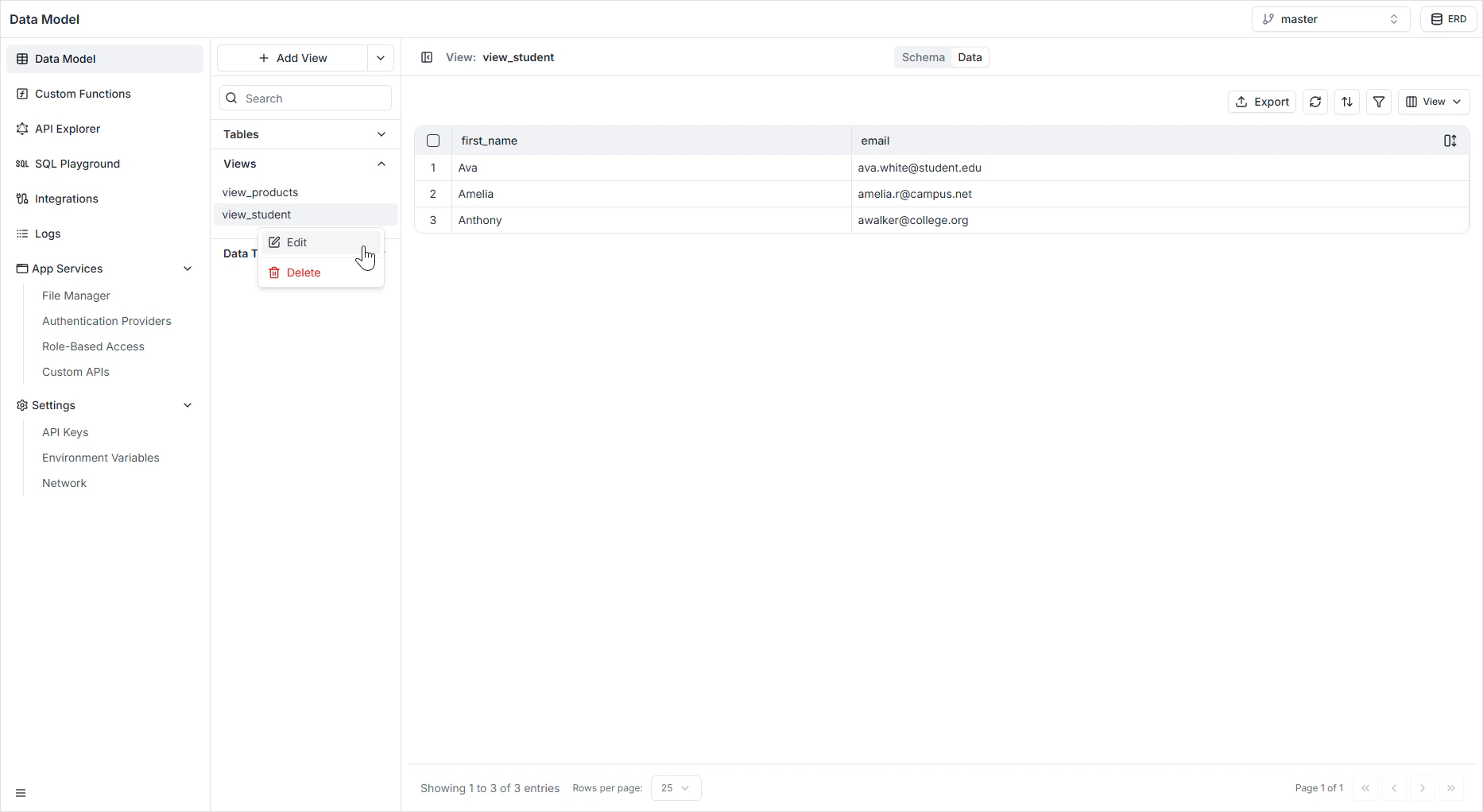 The same context menu has the trash can icon to delete the view permanently.
## How it appears in the API
Each view is exposed in GraphQL as a queryable type with the columns from the `SELECT` clause. Because views are read-only by nature, the API surfaces queries — but not mutations — for them. See the [GraphQL API Explorer](/features/backend/graphql-api-explorer/overview) to confirm the exact shape generated for your view.
## Permissions
Views obey [Role-Based Access](/features/backend/app-services/role-based-access). You can grant read access to a view independently of the underlying tables — that's one reason to use a view to expose a sanitized projection of a sensitive table.
## FAQ
Yes. Views compute their result set from the underlying tables on every query, so they don't accept inserts or updates through the auto-generated API. Mutate the underlying tables directly.
Define a view whose `SELECT` includes the calculation — for example, `SELECT id, first_name || ' ' || last_name AS full_name FROM users`. Clients query the view and get the computed value without it ever being stored.
Stick to tables in your project's schema. The auto-generated API works against your project's namespace, and cross-schema joins fall outside the supported surface area.
The view's query may break. Edit the view to reference the new column name. Test by clicking the play button before saving — the editor will surface SQL errors.
Views are best for SQL-only logic that maps cleanly to a `SELECT`. For logic that needs procedural code, third-party API calls, or complex authorization, write a custom function instead.
The same context menu has the trash can icon to delete the view permanently.
## How it appears in the API
Each view is exposed in GraphQL as a queryable type with the columns from the `SELECT` clause. Because views are read-only by nature, the API surfaces queries — but not mutations — for them. See the [GraphQL API Explorer](/features/backend/graphql-api-explorer/overview) to confirm the exact shape generated for your view.
## Permissions
Views obey [Role-Based Access](/features/backend/app-services/role-based-access). You can grant read access to a view independently of the underlying tables — that's one reason to use a view to expose a sanitized projection of a sensitive table.
## FAQ
Yes. Views compute their result set from the underlying tables on every query, so they don't accept inserts or updates through the auto-generated API. Mutate the underlying tables directly.
Define a view whose `SELECT` includes the calculation — for example, `SELECT id, first_name || ' ' || last_name AS full_name FROM users`. Clients query the view and get the computed value without it ever being stored.
Stick to tables in your project's schema. The auto-generated API works against your project's namespace, and cross-schema joins fall outside the supported surface area.
The view's query may break. Edit the view to reference the new column name. Test by clicking the play button before saving — the editor will surface SQL errors.
Views are best for SQL-only logic that maps cleanly to a `SELECT`. For logic that needs procedural code, third-party API calls, or complex authorization, write a custom function instead.