> ## Documentation Index
> Fetch the complete documentation index at: https://archie.com/docs/llms.txt
> Use this file to discover all available pages before exploring further.
# Creating environments
> Branch a new environment from any active source. Pick a branch mode, choose what configuration to copy, and decide what stays per-environment.
You create an environment by branching from any **active** source. The platform clones the source database, optionally copies configuration resources, and gives you an isolated workspace for development, testing, or staging changes.
## Branch modes
Pick how the source database is cloned:
| Mode | What's copied | Typical use |
| ---------- | ----------------------------------------------------------------------------- | -------------------------------------------------------------------- |
| **Full** | Schema **and** all row data. | QA, staging, performance testing — anywhere you need realistic data. |
| **System** | Schema only — tables, columns, indexes, relationships, enums, views. No data. | Clean dev environments, feature branches you'll seed yourself. |
The mode is set at branch time and recorded on the environment. You can always [merge](/features/backend/environments/merge) schema between environments later regardless of the mode each one was created in.
## Creating from the dashboard
Click the dropdown showing the active environment's name at the top of the project chrome.
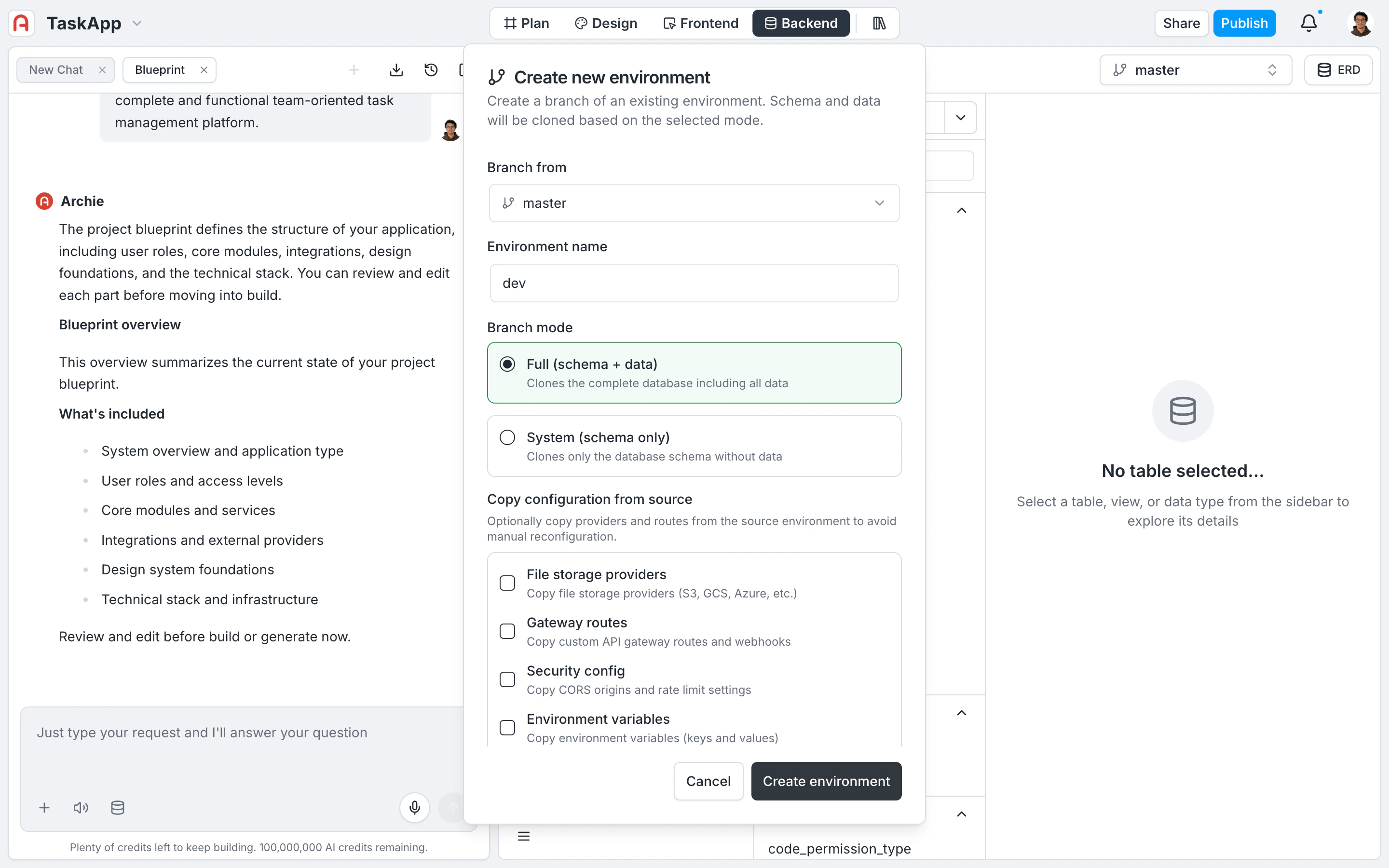
The branching modal opens.
The **Branch From** dropdown lists every environment in `active` status. Environments in `branching`, `merging`, or `error` aren't available as sources until they settle.
Names accept alphanumeric characters, hyphens, and underscores — `staging`, `feature-auth`, `qa-sprint-12`. They have to be unique within the project.
**Full** for schema + data, **System** for schema only.
Tick the configuration checkboxes you want carried over from the source. See [What's copied](#what-s-copied) below for the full list and the security caveat.
The platform validates the name, clones the database, registers the new environment, and copies any selected configuration. Status flips from `branching` to `active` once everything's in place.
 ## What's copied
Each configuration block has its own checkbox. The `ProjectOwner` role is required to enable any of these — they involve carrying sensitive configuration across boundaries.
| Resource | Checkbox label | Carries over |
| ---------------------- | -------------------------- | --------------------------------------------------------------- |
| File storage providers | **File storage providers** | S3, GCS, Azure, Filestack credentials. Each copy gets a new ID. |
| Custom APIs | **Gateway routes** | Custom API gateway routes and webhooks. |
| Network policy | **Security config** | CORS origins and rate-limit settings. |
| Environment variables | **Environment variables** | Key-value pairs for runtime configuration. |
## What's never copied
**Authentication provider secrets and OAuth credentials are never copied** when branching, even if you tick every other checkbox. OAuth client secrets, Cognito credentials, Auth0 tenant keys, and similar credentials must be configured independently in each environment. This is a deliberate isolation boundary so a leaked `dev` secret can't be replayed against `production`.
For the full per-environment scoping list, see [Configuration](/features/backend/environments/configuration). For the auth-provider configuration flow, see [Authentication Providers](/features/backend/app-services/authentication-providers/overview).
## What happens during branching
When you click **Create environment**, the platform runs the following steps. If any step fails, everything rolls back — the new database is dropped, credentials are revoked, and no orphaned resources are left behind.
| Step | What it does |
| ----------------------------- | ----------------------------------------------------------------------------------------------- |
| 1. Validation | Verifies the name is unique and the source is in `active` status. |
| 2. Record creation | Registers a new environment record with the project. |
| 3. Database cloning | Clones the source PostgreSQL database — full data in `Full` mode, schema only in `System` mode. |
| 4. Database users | Provisions fresh database credentials, separate from the source. |
| 5. Configuration registration | Links the new environment to the project. |
| 6. Resource copying | Copies the configuration blocks you ticked. |
| 7. Status activation | Status transitions from `branching` to `active`. |
While branching is in progress, the new environment is visible in the switcher with a `branching` status indicator. You can switch to it once it goes `active`.
## Creating via GraphQL
Use the `branchEnvironment` mutation to create environments programmatically — useful for codifying environment creation alongside infrastructure-as-code.
```graphql theme={null}
mutation BranchEnvironment($input: BranchEnvironmentInput!) {
branchEnvironment(input: $input) {
success
message
environment {
id
name
parentId
parentName
branchMode
branchedAt
status
}
}
}
```
```json theme={null}
{
"input": {
"projectId": "f7e4a264-d659-4719-91e8-c2d74654e529",
"name": "staging",
"sourceEnvironment": "master",
"mode": "full",
"copyFileProviders": true,
"copyGatewayRoutes": true,
"copySecurityConfig": false,
"copyEnvironmentVariables": true
}
}
```
| Field | Type | Required | Description |
| -------------------------- | ------- | -------- | ------------------------------------------ |
| `projectId` | String | Yes | The project's unique identifier. |
| `name` | String | Yes | Name for the new environment. |
| `sourceEnvironment` | String | Yes | Name of the source environment. |
| `mode` | String | Yes | `"full"` or `"system"`. |
| `copyFileProviders` | Boolean | No | Copy file storage configurations. |
| `copyGatewayRoutes` | Boolean | No | Copy custom API gateway routes. |
| `copySecurityConfig` | Boolean | No | Copy CORS and rate limit settings. |
| `copyEnvironmentVariables` | Boolean | No | Copy environment variable key-value pairs. |
Enabling any copy flag requires the `ProjectOwner` role. Without copy flags, standard project access is enough.
## FAQ
Full when you need realistic data — staging, QA, anything resembling production traffic. System when you want a clean, schema-only environment to seed however you like (test fixtures, scripted data). The mode is recorded but doesn't constrain future merges.
Deliberate isolation. Sharing OAuth client secrets across environments means a leak in `dev` compromises `production`. Re-entering credentials per environment makes the security boundary explicit and reviewable.
The copy flags only apply at branch time. After branching, edit each environment's variables individually under [Settings → Environment Variables](/features/backend/settings/environment-variables). For shared values you don't want to edit twice, look at workspace-level secrets.
The platform automatically rolls back. The cloned database and credentials are dropped, and the partially-registered environment record is removed. Your source environment is never touched by a failed branch.
Depends on the source database size in **Full** mode. **System** mode is fast — schema-only clones complete in seconds. Full clones scale with row count and can take a few minutes for large databases. The status indicator stays at `branching` until the clone completes.
## What's copied
Each configuration block has its own checkbox. The `ProjectOwner` role is required to enable any of these — they involve carrying sensitive configuration across boundaries.
| Resource | Checkbox label | Carries over |
| ---------------------- | -------------------------- | --------------------------------------------------------------- |
| File storage providers | **File storage providers** | S3, GCS, Azure, Filestack credentials. Each copy gets a new ID. |
| Custom APIs | **Gateway routes** | Custom API gateway routes and webhooks. |
| Network policy | **Security config** | CORS origins and rate-limit settings. |
| Environment variables | **Environment variables** | Key-value pairs for runtime configuration. |
## What's never copied
**Authentication provider secrets and OAuth credentials are never copied** when branching, even if you tick every other checkbox. OAuth client secrets, Cognito credentials, Auth0 tenant keys, and similar credentials must be configured independently in each environment. This is a deliberate isolation boundary so a leaked `dev` secret can't be replayed against `production`.
For the full per-environment scoping list, see [Configuration](/features/backend/environments/configuration). For the auth-provider configuration flow, see [Authentication Providers](/features/backend/app-services/authentication-providers/overview).
## What happens during branching
When you click **Create environment**, the platform runs the following steps. If any step fails, everything rolls back — the new database is dropped, credentials are revoked, and no orphaned resources are left behind.
| Step | What it does |
| ----------------------------- | ----------------------------------------------------------------------------------------------- |
| 1. Validation | Verifies the name is unique and the source is in `active` status. |
| 2. Record creation | Registers a new environment record with the project. |
| 3. Database cloning | Clones the source PostgreSQL database — full data in `Full` mode, schema only in `System` mode. |
| 4. Database users | Provisions fresh database credentials, separate from the source. |
| 5. Configuration registration | Links the new environment to the project. |
| 6. Resource copying | Copies the configuration blocks you ticked. |
| 7. Status activation | Status transitions from `branching` to `active`. |
While branching is in progress, the new environment is visible in the switcher with a `branching` status indicator. You can switch to it once it goes `active`.
## Creating via GraphQL
Use the `branchEnvironment` mutation to create environments programmatically — useful for codifying environment creation alongside infrastructure-as-code.
```graphql theme={null}
mutation BranchEnvironment($input: BranchEnvironmentInput!) {
branchEnvironment(input: $input) {
success
message
environment {
id
name
parentId
parentName
branchMode
branchedAt
status
}
}
}
```
```json theme={null}
{
"input": {
"projectId": "f7e4a264-d659-4719-91e8-c2d74654e529",
"name": "staging",
"sourceEnvironment": "master",
"mode": "full",
"copyFileProviders": true,
"copyGatewayRoutes": true,
"copySecurityConfig": false,
"copyEnvironmentVariables": true
}
}
```
| Field | Type | Required | Description |
| -------------------------- | ------- | -------- | ------------------------------------------ |
| `projectId` | String | Yes | The project's unique identifier. |
| `name` | String | Yes | Name for the new environment. |
| `sourceEnvironment` | String | Yes | Name of the source environment. |
| `mode` | String | Yes | `"full"` or `"system"`. |
| `copyFileProviders` | Boolean | No | Copy file storage configurations. |
| `copyGatewayRoutes` | Boolean | No | Copy custom API gateway routes. |
| `copySecurityConfig` | Boolean | No | Copy CORS and rate limit settings. |
| `copyEnvironmentVariables` | Boolean | No | Copy environment variable key-value pairs. |
Enabling any copy flag requires the `ProjectOwner` role. Without copy flags, standard project access is enough.
## FAQ
Full when you need realistic data — staging, QA, anything resembling production traffic. System when you want a clean, schema-only environment to seed however you like (test fixtures, scripted data). The mode is recorded but doesn't constrain future merges.
Deliberate isolation. Sharing OAuth client secrets across environments means a leak in `dev` compromises `production`. Re-entering credentials per environment makes the security boundary explicit and reviewable.
The copy flags only apply at branch time. After branching, edit each environment's variables individually under [Settings → Environment Variables](/features/backend/settings/environment-variables). For shared values you don't want to edit twice, look at workspace-level secrets.
The platform automatically rolls back. The cloned database and credentials are dropped, and the partially-registered environment record is removed. Your source environment is never touched by a failed branch.
Depends on the source database size in **Full** mode. **System** mode is fast — schema-only clones complete in seconds. Full clones scale with row count and can take a few minutes for large databases. The status indicator stays at `branching` until the clone completes.