> ## Documentation Index
> Fetch the complete documentation index at: https://archie.com/docs/llms.txt
> Use this file to discover all available pages before exploring further.
# API Keys
> Manage API keys at the developer level.
API keys grant external clients access to your project's APIs. This page covers the developer-side workflow — creating, scoping, and rotating keys.
The **API Keys** section allows you to generate and manage secure tokens for your project. These keys are essential for granting external applications, scripts, or third-party tools access to your project's API without exposing user credentials.
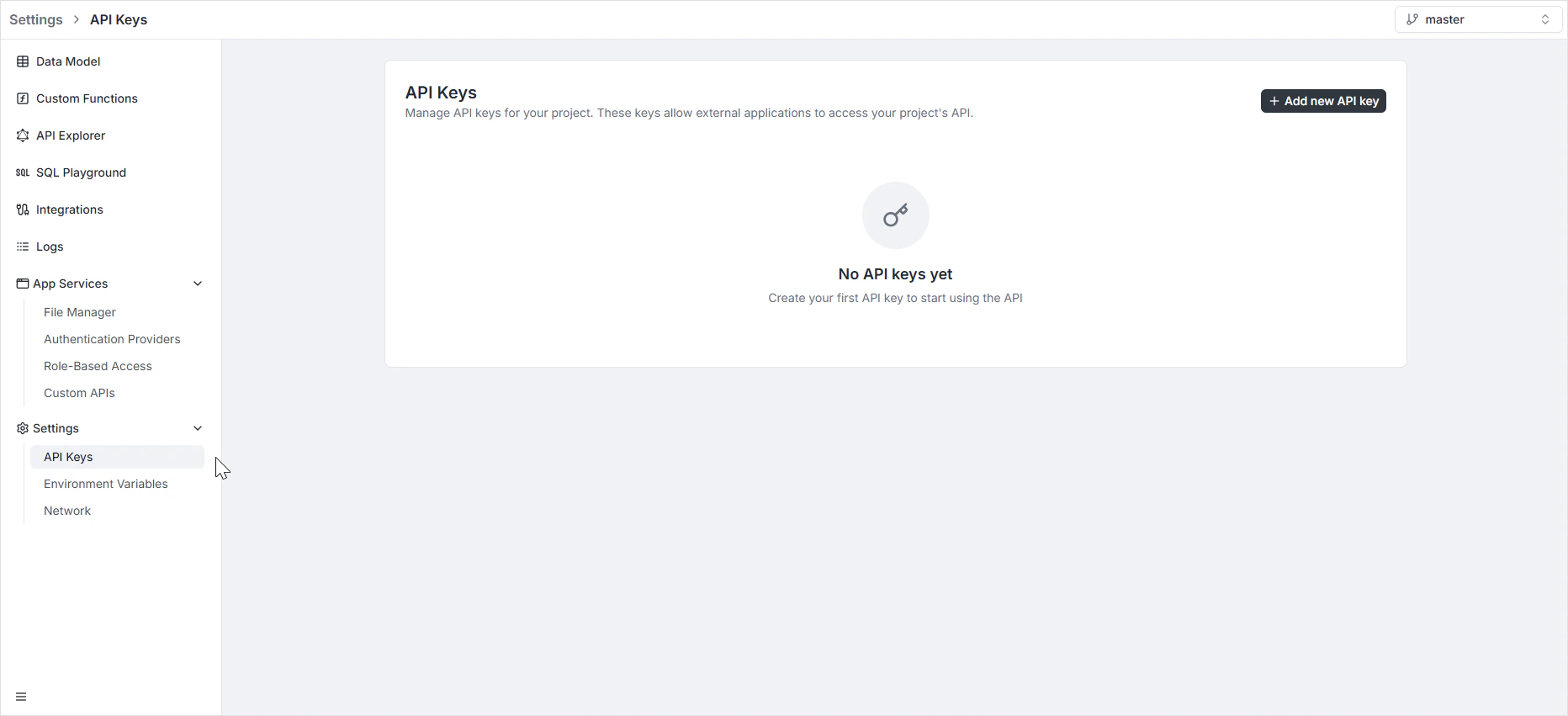
To access this section, navigate to **Settings > API Keys** in the left-hand sidebar menu.
> **Note:** API keys are scoped per environment. Each environment has its own set of API keys, and keys generated in one environment are not valid in another. See [Environments](/features/backend/environments/overview) for the per-environment scoping model.
 ## Creating a new API key
To generate a new credential:
1. Click the black **+ Add new API key** button located in the top-right corner of the dashboard.
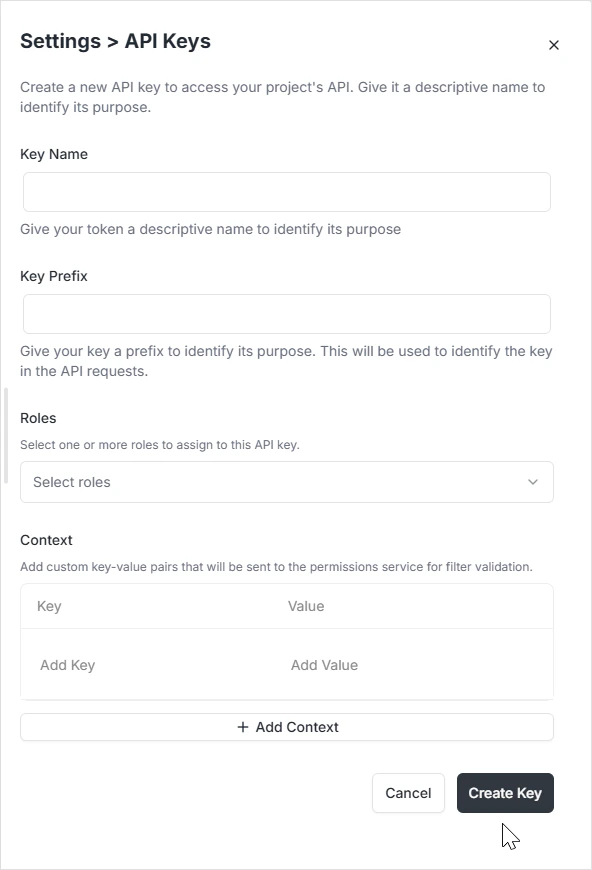
2. A configuration modal titled **Create API Key** will appear.
3. Fill in the required fields to define the key's purpose and structure.
### Configuration fields
* **Key Name:** Give your token a descriptive name to identify its purpose.
* **Key Prefix:** Give your key a prefix to identify its purpose. This will be used to identify the key in the API requests.
* **Roles:** Select one or more roles to assign to this API key. This determines the level of access the key will have. Roles are defined in [Role-Based Access](/features/backend/app-services/role-based-access); the key inherits whatever Read/Write/Update/Delete permissions and row-level filters those roles carry.
* **Context:** Add custom key-value pairs that will be sent to the permissions service for filter validation. This allows for fine-grained access control based on specific attributes.
Once configured, click the **Create Key** button to finalize the process and generate your token.
## Creating a new API key
To generate a new credential:
1. Click the black **+ Add new API key** button located in the top-right corner of the dashboard.
2. A configuration modal titled **Create API Key** will appear.
3. Fill in the required fields to define the key's purpose and structure.
### Configuration fields
* **Key Name:** Give your token a descriptive name to identify its purpose.
* **Key Prefix:** Give your key a prefix to identify its purpose. This will be used to identify the key in the API requests.
* **Roles:** Select one or more roles to assign to this API key. This determines the level of access the key will have. Roles are defined in [Role-Based Access](/features/backend/app-services/role-based-access); the key inherits whatever Read/Write/Update/Delete permissions and row-level filters those roles carry.
* **Context:** Add custom key-value pairs that will be sent to the permissions service for filter validation. This allows for fine-grained access control based on specific attributes.
Once configured, click the **Create Key** button to finalize the process and generate your token.
 > The key value is shown only once at creation. Persist it in your secrets manager immediately.
## Using a key
```bash theme={null}
curl -H "Authorization: Bearer $ARCHIE_API_KEY" \
https://api.yourapp.com/api/projects
```
Or in a typed client, set the auth header on construction.
## Rotation
Plan for key rotation:
1. Create a new key
2. Deploy consumers reading from the new key
3. Verify traffic on the old key has stopped
4. Delete the old key
A short overlap window where both keys work simplifies cutover.
## Audit
Each authenticated request logs the key it used. Filter audit by key when investigating.
## FAQ
Yes — keys are prefixed at creation (configurable via the **Key Prefix** field). The platform-default prefix appears in REST examples as `archie_YOUR_API_KEY`.
Yes via the API mutation. Store the resulting key in your CI's secret store.
Project-scoped, and further scoped per environment. For workspace-level credentials, see workspace secrets.
> The key value is shown only once at creation. Persist it in your secrets manager immediately.
## Using a key
```bash theme={null}
curl -H "Authorization: Bearer $ARCHIE_API_KEY" \
https://api.yourapp.com/api/projects
```
Or in a typed client, set the auth header on construction.
## Rotation
Plan for key rotation:
1. Create a new key
2. Deploy consumers reading from the new key
3. Verify traffic on the old key has stopped
4. Delete the old key
A short overlap window where both keys work simplifies cutover.
## Audit
Each authenticated request logs the key it used. Filter audit by key when investigating.
## FAQ
Yes — keys are prefixed at creation (configurable via the **Key Prefix** field). The platform-default prefix appears in REST examples as `archie_YOUR_API_KEY`.
Yes via the API mutation. Store the resulting key in your CI's secret store.
Project-scoped, and further scoped per environment. For workspace-level credentials, see workspace secrets.