> ## Documentation Index
> Fetch the complete documentation index at: https://archie.com/docs/llms.txt
> Use this file to discover all available pages before exploring further.
# Generating a blueprint
> Submit an idea and let Archie produce your blueprint.
Generating a blueprint is the first thing that happens when you create a project. This page covers how it works and what to expect.
## Submitting an idea
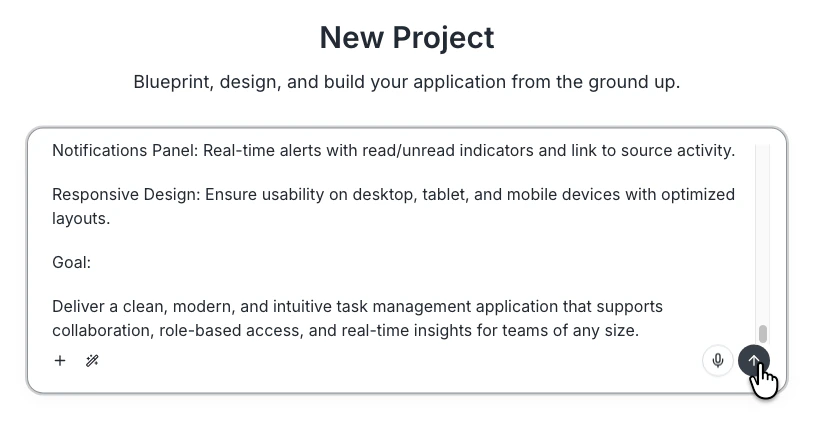
From **New project**, type your idea in the input. There is no prompt template, no required structure, no character minimum. Archie infers what is missing. Examples that work:
* "A booking system for a small dental practice."
* "A course platform where teachers upload lessons and students pay per course. Stripe for payments. Email notifications when a new lesson is published."
* A few paragraphs describing your app in detail.
Click submit. Archie creates the project and starts generating.
 ## What happens during generation
Generation usually completes in 30–60 seconds. While it runs:
* The blueprint page shows a waiting state with status updates
* Archie may ask one or two clarifying questions in the Context tab
* The connection reconnects automatically if you close the tab and come back
When generation finishes, the blueprint page populates with all six sections (Overview, Modules, User types, System services, Integrations, Tech stack).
## What you get
The first blueprint is a starting point, not a final answer. Expect:
* **Modules** that capture the major features in your idea
* **User types** inferred from the description (admin, customer, and so on)
* **System services** chosen based on what your app needs (auth, file storage)
* **Integrations** matched to features in your idea (Stripe if you mentioned payments)
* A **tech stack** preselected for the kind of app you are building
If the first pass is wrong in places, that is normal. Editing is the next step.
## Re-generating
You can regenerate a blueprint section if it is significantly off. Use the regenerate dropdown in the section header. Regeneration costs credits — usually a small amount per section. {/* VERIFY: confirm regenerate credit cost */}
For smaller changes, edit directly or use the [blueprint chat](/features/blueprint/iterating).
## FAQ
The blueprint page shows an error and lets you retry. If retries also fail, contact support.
Initial blueprint generation is included. Regenerating individual sections may use a small number of credits. {/* VERIFY: confirm initial generation is free */}
Paste it as your idea. Archie reads structured notes (bulleted lists, headings) the same as flowing prose.
## What happens during generation
Generation usually completes in 30–60 seconds. While it runs:
* The blueprint page shows a waiting state with status updates
* Archie may ask one or two clarifying questions in the Context tab
* The connection reconnects automatically if you close the tab and come back
When generation finishes, the blueprint page populates with all six sections (Overview, Modules, User types, System services, Integrations, Tech stack).
## What you get
The first blueprint is a starting point, not a final answer. Expect:
* **Modules** that capture the major features in your idea
* **User types** inferred from the description (admin, customer, and so on)
* **System services** chosen based on what your app needs (auth, file storage)
* **Integrations** matched to features in your idea (Stripe if you mentioned payments)
* A **tech stack** preselected for the kind of app you are building
If the first pass is wrong in places, that is normal. Editing is the next step.
## Re-generating
You can regenerate a blueprint section if it is significantly off. Use the regenerate dropdown in the section header. Regeneration costs credits — usually a small amount per section. {/* VERIFY: confirm regenerate credit cost */}
For smaller changes, edit directly or use the [blueprint chat](/features/blueprint/iterating).
## FAQ
The blueprint page shows an error and lets you retry. If retries also fail, contact support.
Initial blueprint generation is included. Regenerating individual sections may use a small number of credits. {/* VERIFY: confirm initial generation is free */}
Paste it as your idea. Archie reads structured notes (bulleted lists, headings) the same as flowing prose.