

Branch modes
Pick how the source database is cloned:
The mode is set at branch time and recorded on the environment. You can always merge schema between environments later regardless of the mode each one was created in.
Creating from the dashboard
1
Open the environment switcher
Click the dropdown showing the active environment’s name at the top of the project chrome.
2
Click + Create Environment
The branching modal opens.
3
Pick the source environment
The Branch From dropdown lists every environment in
active status. Environments in branching, merging, or error aren’t available as sources until they settle.4
Name the new environment
Names accept alphanumeric characters, hyphens, and underscores —
staging, feature-auth, qa-sprint-12. They have to be unique within the project.5
Choose the branch mode
Full for schema + data, System for schema only.
6
Choose what configuration to copy
Tick the configuration checkboxes you want carried over from the source. See What’s copied below for the full list and the security caveat.
7
Click Create environment
The platform validates the name, clones the database, registers the new environment, and copies any selected configuration. Status flips from
branching to active once everything’s in place.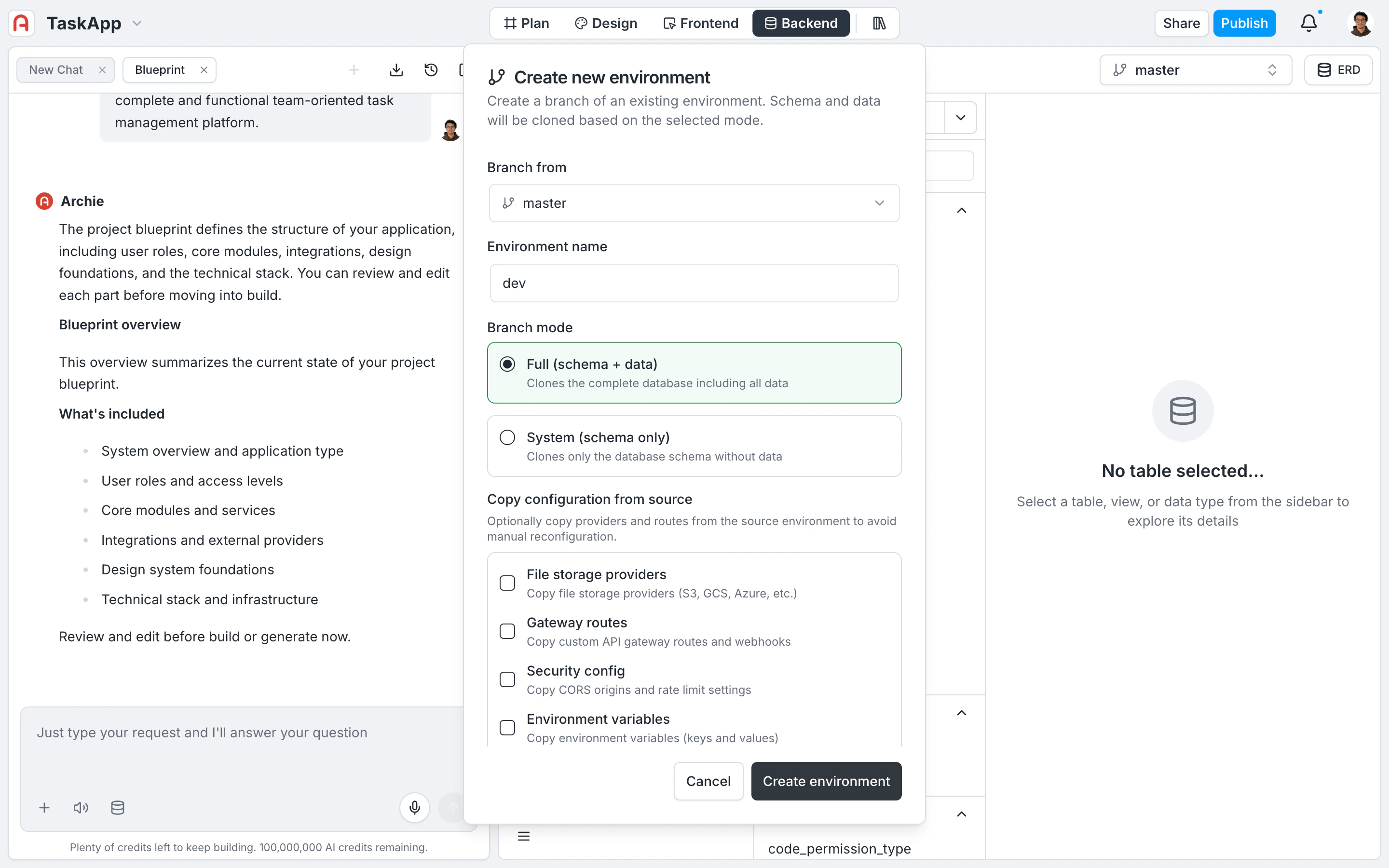
What’s copied
Each configuration block has its own checkbox. TheProjectOwner role is required to enable any of these — they involve carrying sensitive configuration across boundaries.
What’s never copied
For the full per-environment scoping list, see Configuration. For the auth-provider configuration flow, see Authentication Providers.What happens during branching
When you click Create environment, the platform runs the following steps. If any step fails, everything rolls back — the new database is dropped, credentials are revoked, and no orphaned resources are left behind.
While branching is in progress, the new environment is visible in the switcher with a
branching status indicator. You can switch to it once it goes active.
Creating via GraphQL
Use thebranchEnvironment mutation to create environments programmatically — useful for codifying environment creation alongside infrastructure-as-code.
Enabling any copy flag requires the
ProjectOwner role. Without copy flags, standard project access is enough.
FAQ
Should I pick Full or System mode?
Should I pick Full or System mode?
Full when you need realistic data — staging, QA, anything resembling production traffic. System when you want a clean, schema-only environment to seed however you like (test fixtures, scripted data). The mode is recorded but doesn’t constrain future merges.
Why aren't auth provider secrets copied?
Why aren't auth provider secrets copied?
Deliberate isolation. Sharing OAuth client secrets across environments means a leak in
dev compromises production. Re-entering credentials per environment makes the security boundary explicit and reviewable.Can I copy environment variables after branching?
Can I copy environment variables after branching?
The copy flags only apply at branch time. After branching, edit each environment’s variables individually under Settings → Environment Variables. For shared values you don’t want to edit twice, look at workspace-level secrets.
What happens if branching fails halfway through?
What happens if branching fails halfway through?
The platform automatically rolls back. The cloned database and credentials are dropped, and the partially-registered environment record is removed. Your source environment is never touched by a failed branch.
How long does branching take?
How long does branching take?
Depends on the source database size in Full mode. System mode is fast — schema-only clones complete in seconds. Full clones scale with row count and can take a few minutes for large databases. The status indicator stays at
branching until the clone completes.